by Brian Thompson | Mar 15, 2023 | Breach, General, Identity Theft
Silicon Valley Bank (SVB) collapsed on March 10, 2023, which has caused a ripple effect throughout the global financial system. Unfortunately, the SVB Collapse Enables Scammers to take advantage of the situation and use the bank’s downfall to scam people.
SVB was a US-based commercial bank and the 16th largest bank in the country, which also happened to be the largest bank by deposits in Silicon Valley, California. The bank failed after a run on its deposits, which has impacted many businesses and people in the technology, life science, healthcare, private equity, venture capital, and premium wine industries who were customers of SVB.
What they are using
Security researchers have noted that hackers are registering suspicious domains and conducting phishing campaigns, preparing for business email compromise (BEC) attacks. These attacks aim to steal money, steal account data, or infect targets with malware.
Researcher Johannes Ulrich has reported that threat actors are already registering suspicious domains related to SVB that are very likely to be used in attacks. Cyber-intelligence firm Cyble has also published a report exploring developing SVB-themed threats and warning about additional domains. Some examples given in a report published on the SANS ISC and Cyble websites include:
- login-svb.com,
- svbbailout.com,
- svbcertificates.com, svbclaim.com,
- svbcollapse.com,
- svbdeposits.com,
- svbhelp.com,
- svblawsuit.com.
- svbdebt.com,
- svbclaims.net,
- svb-usdc.com,
- svb-usdc.net,
- svbi.io,
- banksvb.com,
- svbank.com,
- svblogin.com.
Many of these sites were registered on the day of the bank’s collapse and are already hosting cryptocurrency scams.
How they are using it
The scammers might attempt to contact former clients of SVB to offer them a support package, legal services, loans, or other fake services relating to the bank’s collapse. Some threat actors are impersonating SVB customers and telling customers that they need payments sent to a new bank account after the bank’s collapse. However, these bank accounts belong to the threat actors, who steal payments meant to go to the legitimate company.
These scam pages tell SVB customers that the bank is distributing USDC as part of a “payback” program. However, clicking on the site’s ‘Click here to claim’ button brings up a QR code that attempts to compromise crypto wallets when scanned.
In another case, the threat actors behind “cash4svb.com” attempt to phish former SVB customers’ contact information who are trade creditors or lenders, promising them a return between 65% and 85%.
SVB Collapse Enables Scammers to take advantage of the situation and use the bank’s downfall to scam people. Overall, people must be vigilant about these scams and take steps to protect themselves from cybercriminals.
related articles
by Brian Thompson | Feb 8, 2023 | Breach, Identity Theft
Artificial Intelligence (AI) has come a long way, bringing numerous benefits. However, it also has the potential to be used for malicious purposes, especially in social engineering. This article will show you how AI can manipulate people and why it’s crucial to be aware of these tactics to protect your personal information.
What is Social Engineering?
Social engineering manipulates individuals into revealing confidential information or performing actions that benefit the attacker. Attackers use various methods, such as emails, phone calls, or in-person interactions. AI can automate these tactics and make them even more sophisticated.
How AI Manipulates People
AI can manipulate people through voice assistants. AI-powered voice assistants can mimic human voices, making it hard to tell the difference between a human and an AI. This can trick individuals into revealing personal information, leaving them vulnerable to attack. Here is an example story from Knowbe4.
Chatbots are another tool that AI uses for social engineering. Chatbots can hold conversations with individuals, leading them to reveal personal information. People often trust chatbots, thinking they are human, but chatbots can be programmed to manipulate individuals into revealing sensitive information, which attackers can then use for malicious purposes.
Why You Must Be Cautious
Attackers value personal information, such as Social Security numbers, credit card numbers, and home addresses. AI-powered social engineering increases the risk of this information falling into the wrong hands. The tactics used are sophisticated and hard to detect.
To protect your personal information, be cautious when interacting with AI-powered voice assistants or chatbots. Provide personal information only to trusted sources. Be wary of suspicious emails or phone calls that ask for personal information.
AI has the potential to manipulate people through social engineering. Be aware of these tactics and protect your personal information by being cautious when interacting with AI-powered voice assistants or chatbots. Only reveal personal information to trusted sources and be cautious of suspicious emails or phone calls.
If you like this article, Artificial Intelligence & Social Engineering: You Need to Know, please share!
Related articles:
by Brian Thompson | Feb 2, 2023 | Breach
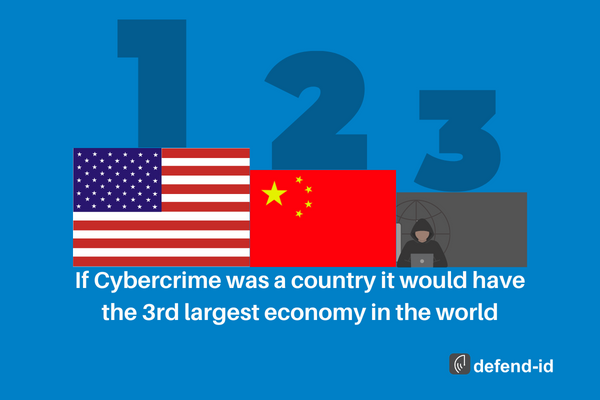
Cybercrime is the third largest economy in the world, with costs estimated at around $8 trillion globally. This staggering figure highlights the alarming reality of the current digital landscape and the importance of taking cybersecurity measures seriously.
The United States and China, two of the largest economies in the world, are not immune to the threat of cybercrime. It is imperative that businesses, government organizations, and individuals take proactive steps to protect their assets and sensitive information. This includes investing in security measures such as firewalls, encryption technologies, and regular software updates, as well as preparing for potential breaches by having a comprehensive response plan in place.
Moreover, companies have a responsibility to protect their employees and customers from the damaging effects of a cyberattack. Personal information, financial data, and confidential business information must be kept secure to prevent identity theft, fraud, and loss of revenue.
Investing in cyber security is not just about protecting assets; it’s also about building trust with stakeholders. To ensure that they are protected against potential attacks, businesses must adopt a transparent and proactive security strategy. They must develop policies and procedures to protect their systems and invest in cutting-edge technology such as firewalls, anti-malware programs, and encryption software
Cybercrime is an alarming reality that is having a significant impact on the global economy. Companies and individuals must take proactive steps to secure their systems and protect sensitive information to avoid the devastating consequences of a cyberattack. The time to invest in cyber security is now, before it is too late.
Feeling unprepared for a breach?
We hear it all the time, breaches happening over and over again but what can we do to prepare for one? What plans do we have in place for when it happens? defend-id4B is here to give you a simple path to ensure you are ready.
defend-id4B provides your business with pre-breach response planning, post-breach regulatory response and notification services, and fully managed fraud recovery for compromised clients. Along with dark web monitoring, and business fraud restoration.
Related Breach article concerning the healthcare industry: Healthcare Breaches and Medical ID Theft
by Brian Thompson | Dec 28, 2022 | Breach, Identity Theft
Are financial companies protecting your personal data from Identity Theft and Fraud?
In July, I read that “cumulative merchant losses to online payment fraud globally between 2023 and 2027 will exceed $343 billion,” according to Juniper Research.
Online payment fraud includes losses such as those from digital sales, physical goods, banking transactions, and peer-to-peer payment apps.
I also read a November Consumer Affairs article titled “Scammers are using Facebook Marketplace, Zelle, and PayPal to snare new victims,” where “scammers are impersonating recognized businesses like Amazon, Apple, and other name-brand companies to appear reputable to their target, to then run off with their personal or financial information.”
Consumer Affairs reported, “the top 5 scams were bank/credit card (10.3%), debt/loan (6.6%), and free money (6.4%).”
According to Jim Luff, Corporate Communications Manager at Aurora Payments (a leading payment service and solutions provider), Aurora sent a March 2022 message to its merchants where Aurora Payments explained how the chargeback process is often used to commit fraud by claiming merchandise was not received, misrepresented or the result of “friendly fraud.”
In friendly fraud, online orders are placed by someone known to the cardholder, such as a child using a parent’s credit card without their knowledge. Aurora Payments shares detailed information about chargeback fraud in their merchant message, “The Great Chargeback Surge of 2022.
Consumer Affairs also reported that “many of the scams target consumers who use peer-to-peer payment services and other platforms connecting users directly to one another” and that “scammers were also “lurking” on P2P cash transfer apps Zelle (86%) and PayPal (31.8%).”
Fortunately, according to this November New York Times article titled “Banks Plan to Start Reimbursing Some Victims of Zelle Scams,” the seven banks that own Zelle (Bank of America, Capital One, JPMorgan Chase, PNC, Truist, U.S. Bank, and Wells Fargo) will now compensate customers who fall victim to certain kinds of Zelle related scams, including fake bank fraud texts, emails, and phone calls.
Which leads me to…
All of the above leads me to the Money20/20 USA Fintech Conference that I attended in October. It’s the largest global fintech event connecting the payments industry, including issuers (e.g., banks and credit unions providing debit, credit, or prepaid cards to consumers) and payment processors (e.g., Stripe, PayPal, or Square), along with payment networks such as American Express, Mastercard, and Visa.
During the conference, I picked up a copy of The State of Fraud and Financial Crime in the U.S., a survey of 200 financial institutions with assets of at least $5 billion. The surveyed executives held leadership positions in fraud and risk operations, money laundering, fraud strategy, fraud management, and technology and data science.
According to the survey, sponsored by PYMNTS, 62% of financial institutions reported an increase in financial crime year over year. Additional survey highlights included the following:
- The average cost of scams to each financial institution was $102 million.
- Fraud rates and losses increased for nearly all payment types in 2021.
- Smaller financial institutions are getting attacked the most.
- Authorized and unauthorized fraud types currently appear to be relatively equal, but scams are on the rise within authorized fraud.
- Criminal approaches are becoming more sophisticated, and most financial institutions consider this to be a problem.
What does all this mean? It means that while consumers are big targets for identity theft, fraud, and scams, financial institutions are bigger targets.
So back to the title of this article: are Are financial companies doing enough to protect your personal data from Identity Theft and Fraud? My answer is threefold:
- First, and based on my experience at the Money 20/20 Conference, I believe the payments processing industry is doing a good job managing fraud prevention to help make payment transactions safer for both consumers and businesses.
- Second, Zelle’s proposed rule change for early next year requiring the network’s member banks to compensate customers who fall victim to certain kinds of scams is very positive.
- Finally, based on the reality of bad actors such as nation states, cyber thieves, and identity theft criminals, the financial services industry will continue to be heavily targeted by identity thieves due to a large consumer account base and the significant amount of personal data these institutions collect and store.
by Mark Pribish
Practice Leader, Identity Theft, and Data Breach Services
43% of Breaches Affect Small Businesses
Why Provide Identity Theft Protection as an Employee Benefit?
by Brian Thompson | Dec 8, 2022 | Breach, Identity Theft
Gift card fraud rises during the holidays every year. So many of us love buying and using gift cards as gifts. They are practical, simple to purchase, simple to use, and simple to give as gifts. They typically let the recipient choose exactly what they want, and they are frequently given as rewards for actions.
According to estimates, the market for gift cards is worth hundreds of BILLIONS of dollars. Nobody dislikes receiving a free gift card, right? BUT, gift cards are unfortunately frequently used by con artists to defraud their victims of money.
There are many ways gift cards can be used by scammers, here are the top three, as noted by KnowBe4:
You Have to Use Gift Cards to Pay a Bill
One very typical scam involves a potential victim being contacted by someone, usually via voice call (although it can also be done via text message or email), and being informed that either their regular payment to a reliable service has been declined or that there is a new emergency charge. A good illustration of the former is when a con artist calls pretending to be the victim’s electric company. They will claim that the victim’s regular electricity payment was rejected and that unless they visit a store and pay the bill with gift cards, their electricity will be turned off in a matter of hours. Who would use gift cards to pay their electricity bill? You would be shocked. A who’s who of medical professionals, attorneys, and even law enforcement. People who previously thought they were too savvy to get scammed are often on the victim list.
A good illustration of the latter scam is when a caller pretends to be from the IRS or law enforcement and informs the victim that they owe an unpaid fine and that they will be arrested if they don’t pay right away. Who would think that the police or the IRS would take gift cards as payment for a fine? Once more, a higher proportion than you might guess.
How can you avoid this scam?
There is a very high chance that a request for an emergency payment is fraudulent, especially if it involves gift cards. If the caller is willing to provide their contact information, you can take it. If you ask them for their contact information, they typically hang up the phone immediately. In either case, get in touch with the company. Using a known phone number or email address and inquire about how to confirm the request’s legitimacy. The legitimate company will put you in touch with their billing department so you can confirm the request and pay the bill if it is genuine.
Gift Cards That Have Been Maliciously Modified in Stores
In this scheme, thieves steal department store gift cards, discover their personal PIN numbers, and then put them back on the shelves where a victim will find them. The fraudster can frequently spend the value of the gift card faster than the victim when the victim purchases the previously tampered with card and activates it. To find out when the gift card is activated and how much money is still on it, the fraudster can repeatedly call the store’s gift card number.
How can you avoid this scam?
When you purchase a gift card, check to see if it has been tampered with in any way. Choose gift cards from the bottom of the stack; this is not foolproof but may help. Most major retailers who use gift cards are aware of these scams, and many will you to guard against them. Some of them may even offer to reimburse you if you lose money.
“Win a free gift Card!”
This is a huge scam, particularly during the holidays. It’s a common gimmick to offer “Win a free $100 Amazon Gift Card!” Either you are required to download and run a file to “transfer” the gift card to you, or they will request personally identifiable information from you, such as your social security number or bank account information. There are thousands of legitimate circumstances where anyone can win a free gift card, which makes this particular phishing scam effective.
These scams can be easy to recognize because, despite the fact that they purport to be from a well-known, reputable company, the gift card URL, phone number, or email address is not from that company. Instead, they appear at random in emails or texts. But, again, this can be challenging because many trustworthy businesses hire outside contractors to handle their real free gift card distribution. It’s possible that the URLs, phone numbers, and email addresses you see don’t correspond to the actual, legitimate vendors.
When the offer is simply too good to be true, it more than likely is.
There are tons Gift Card Frauds During the Holidays. It’s typically a scam if someone contacts you and demands that you use a gift card to pay a bill. Simply ignore them if you can’t positively, unquestionably confirm that the gift card reward or request is legitimate or that a card hasn’t been tampered with. A $100 gift card is not worth the risk of losing your bank account and personal information.
Here is some guidance from the FTC regarding gift card fraud.
by Brian Thompson | Sep 22, 2022 | Breach, Identity Theft
So we hear ads about Identity Theft Protection pretty much every day now. But what’s ID Theft Protection, and what is the benefit?
Why should you care?
Because this is happening every day to people you know…causing stress, anxiety, problems at work and with family, and sleepless nights!
First, identity theft is not entirely avoidable, but there are things you can do to protect yourself. An Identity theft protection service can alert you to potential fraud and restore your identity if it gets stolen.
Identity Theft providers do the hard work for you. They do this by searching for your personal information on the dark web, social media, and other databases that can indicate bad actors have your information. Victims who are protected with an Identity theft protection program can turn to recovery advocates. Recovery advocates work for the provider and are specialists in Identity Theft Recovery services. The advocate will take over and complete tasks on behalf of the victim to ensure all concerns and steps are taken care of properly. Many services also offer insurance that can offset legal fees and other expenses related to restoring your identity.
What is identity theft protection?
Identity theft protection services monitor websites and databases for signs of your personal information, such as your social security, driver’s license number, medical ID, and bank account numbers.
When the provider finds your information where it should not be, they will send an alert suggesting a variety of actions. Monitoring will include a variety of places including sources such as, but not limited to:
- Dark web
- *Credit Monitoring
- Social media
- Change of Address Monitoring USPS
- Home Title Changes
- Court Records
- Utility, cable, or wireless services
- Payday loan applications
- Public Records
*Many identity theft protection services also include credit monitoring features. This generally provides notifications when credit is pulled and for changes to your credit report. Changes such as an increase in a credit card balance or a new account opened in your name, can indicate fraud.
And if your information is compromised, identity theft protection services kick in and help you resolve the issue. Most providers also include identity theft insurance, which offers up to $1 million for eligible expenses associated with resolving and restoring your identity, plus assistance from experts.
Buy or not to buy?
Identity theft protection services provide “Peace of Mind with a Place to Turn”. They help you detect fraud early, making it easier to stop the damage before it becomes an even bigger headache. These services are not free but they are a proactive solution to securing your personal information.
Before you sign up for one of these services, take time to understand how these services work to spot fraud and help you restore your identity. Just like in any industry, not all programs are the same. Pay close attention to the Recovery aspect of the service specifically!
Mitigate, Insure against losses, and be a resource when identity theft happens. The peace of mind comes with a nominal fee. Ask your employer if they offer Identity Theft Protection as an employee benefit!