by Brian Thompson | Jun 10, 2026 | Uncategorized
Last updated: June 2026
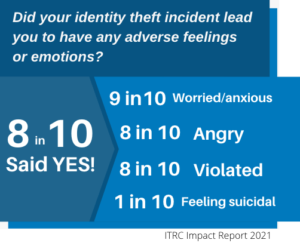
Identity crime isn’t a one-time event anymore. The Identity Theft Resource Center’s 2026 Trends in Identity Report, released June 9, 2026, found that 25.6% of victims are now dealing with two or more identity crimes at the same time, up from 23.5% the year before. And for the first time, hacked devices, not scams, are the top way criminals get in for adults ages 35 to 64. Unauthorized access to computers and phones jumped 78% year over year, from 15.3% to 27.2% of all reported compromises.
Below are seven rapid-fire answers to the questions we hear most, updated with what’s actually happening in 2026 and what to do if it happens to you.
Table of Contents
- How can I tell if my identity has been stolen?
- What is a fraud alert and how do I place one?
- How do I freeze my credit, and why bother?
- What steps protect my identity online and offline?
- What should I do if I’m a victim?
- How do scammers steal my information?
- Identity theft vs. financial fraud: what’s the difference?
1. How can I tell if my identity has been stolen?
Watch for:
- Accounts you don’t recognize showing up on your credit report
- Hard inquiries you didn’t authorize
- Bills or statements that suddenly stop arriving
- Charges, withdrawals, or account changes you can’t explain
- Password reset emails or two factor codes you didn’t request, a common sign someone has accessed your device or an account directly
The fastest way to catch these red flags is to check your credit report at least every four months (free at AnnualCreditReport.com), or use always on monitoring like defend-id, which watches your credit, accounts, and personal information continuously and alerts you the moment something changes.
2. What is a fraud alert and how do I place one?
A fraud alert tells lenders to take extra steps to verify your identity before opening new credit in your name. Contact any one of the three credit bureaus, Equifax, Experian, or TransUnion, and they are required to notify the other two automatically. A standard fraud alert lasts one year and is renewable. Confirmed identity theft victims can place an extended alert that lasts seven years.
3. How do I freeze my credit, and why bother?
A credit freeze blocks anyone, including you, from opening new credit in your name until you lift it. It’s free, takes a few minutes per bureau, and is one of the strongest steps you can take to stop new account fraud. You’ll get a PIN or password to temporarily lift the freeze whenever you need to apply for credit yourself.
4. What steps protect my identity online and offline?
Online:
- Use strong, unique passwords for every account. A password manager makes this painless.
- Turn on multi-factor authentication wherever it’s offered.
- Keep your phone, computer, and apps updated. With device compromise now the leading cause of identity crime for adults 35 to 64, an unpatched device is one of the easiest ways in for criminals.
- Be skeptical of unexpected texts, emails, or calls asking you to log in, verify your identity, or share a code.
Offline:
- Shred documents containing personal or account information.
- Lock your mailbox or sign up for USPS Informed Delivery to spot mail theft early.
- Review your bank and credit card statements weekly, not just monthly.
5. What should I do if I’m a victim?
Move fast, in this order:
- File a report at IdentityTheft.gov to get a personalized recovery plan.
- Contact your banks and card issuers to lock down compromised accounts.
- Place a fraud alert or credit freeze.
- File a police report if you have specific suspects, a financial loss, or need it for disputes.
- Document everything: dates, names, reference numbers, and copies of statements.
Here’s the part most people don’t expect. The ITRC’s 2026 data found that 53% of victims with no financial loss were able to fully resolve their case, but only 9% of victims with any financial impact did. Among victims with three or more financial impacts, 0% reported a resolution. Once money is involved, most people get stuck.
That gap is exactly why defend-id includes fully managed recovery with certified restoration specialists. Instead of spending hours on hold with banks, credit bureaus, and government agencies, our team handles the calls, paperwork, and follow up until your case is resolved.
6. How do scammers steal my information?
| Method |
How it works |
| Device compromise |
Hacking into your phone or computer through malware, unpatched software, or unauthorized access. Now the top vector for adults 35 to 64, up 78% year over year, from 15.3% to 27.2% of compromises. |
| Scams (phishing, vishing, smishing) |
Tricking you into handing over information directly through fake emails, calls, or texts. Still the highest volume method overall, but down from 43.1% to 36.1% of compromises as device attacks rise. |
| Data breaches |
A company you do business with gets hacked, exposing your information along with everyone else’s. |
| Physical theft |
Stolen wallets, mail, or documents containing your personal information. |
| Social engineering |
Manipulating you, or someone at a company, into handing over access or information through deception rather than hacking. |
Account problem scams remain the highest volume scam type, and 74% of victims who fell for one shared high value personal information, the highest rate of any scam category. Job and employment scams are a close second.
7. Identity theft vs. financial fraud: what’s the difference?
Financial fraud is the misuse of an account you already have, such as someone making unauthorized charges on your existing credit card.
Identity theft is when someone uses your personal information to open new accounts, file fraudulent tax returns, or apply for jobs, loans, or government benefits in your name.
The distinction matters because the steps to fix each one are different, and identity theft typically takes much longer and more effort to fully resolve.
The Bottom Line
Identity crime in 2026 looks different than it did even a year ago. Criminals are layering attacks, hacked devices have overtaken scams as the top entry point for working age adults, and the data shows that once a financial loss happens, most victims never see their case fully resolved on their own.
That’s where defend-id comes in. Our monitoring watches for warning signs across your credit, accounts, dark web exposure, and personal information. If something does go wrong, our restoration team works your case until it’s resolved, not just until you stop calling.
Next Steps: Pick What Fits You Best
- Book a 15 minute demo to see how defend-id monitoring and recovery works.
- Grab our free quick action PDF for what to do in the first 24 hours after identity theft.
- Share this guide with someone who needs it.
Resources
by Brian Thompson | May 27, 2026 | Uncategorized
Last Updated: May 2026 | Reading time: ~10 minutes
In January 2026, a coordinated group of attackers worked through a list of companies and started calling employees. No malware. No exploit code. They called the help desk, said they were from IT, and asked the employee on the other end to confirm their login credentials so a ticket could be resolved. At hundreds of organizations, it worked. The attackers walked away with single sign-on credentials, enrolled their own devices into the victim’s multi-factor authentication system, and helped themselves to whatever cloud data they wanted.
That campaign, tracked by Mandiant and documented in detail by Google’s Threat Intelligence Group, is one of the clearest illustrations of where the threat is moving. Vishing attacks, voice-based phishing delivered by phone call, surged 442% between the first and second half of 2024, according to CrowdStrike’s 2025 Global Threat Report. They now account for more than 60% of phishing-related incident response engagements, and 19% of all data breaches trace back to vishing or smishing as the initial point of entry, according to the 2025 Verizon Data Breach Investigations Report.
The phone was supposed to be safer than email. For small businesses and their employees, it no longer is.
What Is a Vishing Attack?
Vishing is short for voice phishing. It follows the same logic as email phishing: an attacker impersonates a trusted person or organization to extract sensitive information. The delivery method is a phone call rather than a message.
A vishing attacker might pose as your IT department, a bank fraud investigator, an IRS agent, a benefits administrator, or a vendor your company actually uses. The goal is to get the person on the other end to hand over credentials, confirm account details, approve a transaction, or take an action they otherwise would not. The calls are frequently scripted, often professionally delivered, and increasingly backed by research pulled from LinkedIn, company websites, and data exposed in previous breaches.
Vishing sits alongside smishing (SMS phishing) and social engineering as part of the same family of human-targeted attacks. Unlike technical exploits that require finding a software vulnerability, these attacks target the person, not the system. Training and awareness are the primary defenses, which also makes them the defense most organizations underinvest in.
Why Vishing Works: The Psychology Behind the Call
Phone calls carry a level of trust that email has largely lost. Most employees have been warned about suspicious links in email. Far fewer have been trained to question a caller who sounds authoritative, knows their name, and references a plausible situation.
Vishing works because attackers exploit predictable human reactions. Urgency is the most reliable tool. A call that opens with “your account shows unauthorized access and we need to verify your identity right now” pushes the target toward action before they have time to think. Fear and authority follow closely. A caller who sounds like they belong to IT, security, or a regulatory body triggers a compliance instinct in most employees, especially newer ones.
The Keepnet 2024 Voice Phishing Response Report found that 6.5% of employees handed over sensitive information during simulated vishing calls. That number climbs significantly in high-pressure sectors: manufacturing and engineering showed a susceptibility rate of 19.2%, and customer support teams clocked in at 11.5%. For small businesses where one person handles multiple roles, a single successful call can expose far more than one account.
Small business employees face 350% more social engineering attempts than employees at large enterprises, according to industry research. Larger companies have IT security teams, call verification procedures, and dedicated training programs. Most small businesses have none of these. Attackers know which end of that equation is easier to work.
How AI Has Transformed the Threat
Vishing was already effective before generative AI made it significantly worse. Current voice cloning tools can produce a convincing replica of someone’s voice from as little as three seconds of audio, according to research cited by McAfee. Earnings call recordings, podcast appearances, LinkedIn videos, and company overview content on YouTube all provide more than enough raw material.
Deepfake-enabled vishing attacks surged more than 1,600% in the first quarter of 2025 compared to the final quarter of 2024. The FBI issued a formal public warning in December 2025 documenting cases where attackers used AI-generated voice messages to impersonate senior government officials, establishing trust before asking targets to hand over account access. The same technique that worked on government contacts works on employees who receive a call from someone who sounds exactly like their CEO or IT director.
AI has also scaled the operation. Voice bots can now handle thousands of simultaneous calls, conducting initial outreach and screening for targets before a human attacker takes over for the sensitive part of the conversation. What once required one attacker per call now allows a small group to run campaigns against hundreds of organizations at once, which is precisely what the January 2026 campaign demonstrated.
The FBI’s 2025 Internet Crime Report logged more than 22,000 AI-related fraud complaints with losses exceeding $893 million. Researchers at Deloitte project that AI-enabled fraud losses in the U.S. could reach $40 billion annually by 2027. Neither figure accounts for unreported incidents, which the FBI estimates represent the large majority of what actually occurs.
How a Vishing Attack Actually Unfolds
Understanding the sequence of a vishing attack helps employees recognize it before they get to the part where they hand over credentials. The pattern is more predictable than it feels in the moment.
Reconnaissance comes first. Before the call, the attacker builds a target profile. Your employee’s name, role, and manager are on LinkedIn. Your company’s phone system, vendors, and software tools are often findable through job postings, review sites, or prior breach data. The attacker uses this to make the call feel internal rather than external.
The call opens with context, not a request. A caller who immediately asks for your password triggers suspicion. A caller who opens by referencing your ticketing system, your IT vendor by name, or a recent company event first sounds like they belong. The request comes after trust is established, often framed as a routine verification step.
Urgency closes the gap. Once the target is engaged, the attacker introduces a problem that requires immediate action: an account showing suspicious login attempts, a system update that must be completed before end of day, a fraud alert that will lock the account in minutes. The urgency is designed to short-circuit the instinct to pause and verify.
The follow-through varies by goal. Some attackers want credentials directly. Others direct the target to a convincing fake login page. In the 2026 ShinyHunters campaign, the goal was often to get employees to approve a new MFA device enrollment, which handed the attacker persistent access to the account even after the call ended. Recovery from that kind of compromise is significantly more complicated than a simple password reset.
Recognizing a Vishing Call: What Employees Need to Know
No technical tool stops a vishing call before it reaches an employee. The recognition has to happen during the conversation. These are the signals employees should learn to identify.
Pressure to act immediately. Legitimate IT teams, banks, and government agencies do not require instant action over the phone to prevent account suspension. If a caller insists that you must do something right now and cannot call back to verify, that urgency is the attack. Slow down, not down.
Requests for credentials, MFA codes, or remote access. No internal IT person needs your password to fix a problem on your account. Not one bank needs your full card number to investigate fraud. No government agency resolves a matter by requesting payment over the phone. Any caller asking for these things, regardless of how plausible the context sounds, is asking for something a legitimate caller never would.
Caller ID that matches a known organization. Caller ID is trivially spoofed. A call appearing to come from your bank’s main number, your company’s IT line, or a government agency phone number proves nothing about who is actually calling. The display is not authentication.
Escalating pressure after initial resistance. When an employee says “let me call you back on the number I have on file,” a legitimate caller agrees. An attacker objects, explains why that will not work, and escalates the urgency. That objection is itself a red flag.
Requests to install software or approve a notification. Being directed to install a remote access tool or approve an authentication push mid-call is a reliable indicator of a compromised interaction. Stop the call and report it to IT or a manager before taking any action.
What Small Businesses Should Put in Place
Technical controls help but are not sufficient on their own. The goal is to reduce the window where a successful vishing call can cause damage before anyone notices.
Establish a verbal verification procedure. Employees should know exactly what to say when they receive an unsolicited call requesting sensitive action: “I need to verify this request by calling you back on our internal directory.” Write the procedure down. Include it in onboarding.
Adopt phishing-resistant MFA for critical systems. Push-notification MFA is better than nothing but can be manipulated in a live call. Hardware security keys and passkeys are significantly harder to compromise through social engineering because they do not produce a code an employee can read aloud or approve remotely.
Limit what employees can do in a single call. High-risk actions such as resetting account credentials, approving new device enrollments, or authorizing wire transfers should require a second channel of verification. A call-back to a known number, a manager confirmation, or a written ticket submission each add a step an attacker cannot easily replicate.
Train employees on the specific scripts attackers use. General security awareness training is less effective than training that shows employees what an actual vishing call sounds like. KnowBe4 and other providers offer vishing simulation programs that test employees with realistic calls and follow up with targeted coaching for those who engage.
Create a no-consequence reporting culture. An employee who almost fell for a vishing call and then caught themselves needs to feel safe reporting it. If the culture punishes near-misses, the near-misses stop getting reported and the organization loses the early warning signals it needs to respond before a breach occurs.
If an Employee Does Fall for a Vishing Call
Speed matters more than perfect procedure in the first hour. Assume the account is compromised and act accordingly.
- Have the employee report it immediately, without shame or delay. The faster the response, the narrower the attacker’s window.
- Reset the affected account credentials and revoke any active sessions from the administrative side, not just by changing the password from the user side.
- Audit recent MFA device enrollments on the account. If a new device was added during or after the call, remove it immediately and investigate what was accessed during that enrollment window.
- Check connected SaaS applications. In the 2026 campaign pattern, once attackers had SSO access they moved laterally across every connected platform. The breach is rarely limited to the one account the employee handed over.
- Notify affected employees whose personal data may have been accessed. If employee records, HR data, or benefits information was in scope, those individuals may face downstream identity theft risk and should be informed promptly.
- File an IC3 complaint with the FBI. Vishing incidents are underreported, which limits law enforcement’s ability to track and disrupt the groups running these campaigns.
The recovery burden falls on the individual employee as much as it falls on the company. A vishing call that results in credential theft can be the starting point for identity fraud that follows that employee for years: fraudulent accounts opened in their name, tax fraud filed under their Social Security number, or unauthorized benefit claims that create complications across multiple agencies. That recovery process is slow, stressful, and time-consuming without help.
Identity theft protection services with live recovery advocates can handle much of that process on behalf of the affected employee, including contacting credit bureaus, disputing fraudulent accounts, working with government agencies, and monitoring for new fraud as it surfaces. Offering that coverage as an employee benefit means your team has somewhere to turn the moment a call goes wrong, rather than spending weeks figuring it out alone.
Frequently Asked Questions About Vishing Attacks
What is the difference between vishing, phishing, and smishing?
Phishing is the broad category of attacks that use deception to steal information or credentials. Phishing delivered by email is simply called phishing. Smishing is phishing delivered by text message. Vishing is phishing delivered by voice call. All three use the same psychological mechanics but reach the target through a different channel.
Can caller ID be trusted to verify who is calling?
No. Caller ID spoofing is cheap, widely available, and requires no technical expertise. Attackers routinely display the phone numbers of banks, government agencies, or internal company lines to make their calls appear legitimate. A phone number on your screen is not evidence that the caller is who they claim to be.
Are small businesses really targeted by vishing attackers?
Yes, and disproportionately so. Smaller organizations typically lack the call verification procedures, dedicated security staff, and employee training programs that make vishing harder to execute against larger enterprises. Research shows small business employees face significantly higher rates of social engineering attempts per person than their counterparts at large companies. The lower defenses make the effort-to-reward ratio attractive for attackers running volume campaigns.
What should an employee do when they receive a suspicious call?
Tell the caller you need to verify the request and that you will call back on a number from your company’s internal directory or the organization’s official website. Do not use a number the caller provides. If the caller objects or escalates pressure, end the call and report it to IT or a manager immediately. The willingness to wait for a call-back is one of the clearest separators between a legitimate caller and an attacker.
How does AI voice cloning make vishing more dangerous?
AI voice cloning tools can replicate a person’s voice convincingly from a small sample of recorded audio. That means attackers can impersonate a CEO, a manager, an IT director, or anyone else whose voice appears in a recording online. Earnings calls, podcast appearances, company videos, and even voicemail greetings can all serve as source material. The result is a call that sounds exactly like a trusted person, which significantly raises the likelihood that an employee will comply with the request.
Does MFA protect against vishing attacks?
Standard push-notification MFA provides some protection but can be defeated in a live call. An attacker who has already obtained a username and password can trigger an MFA push and then ask the employee to approve the notification during the call. Phishing-resistant MFA methods, specifically hardware security keys and passkeys, are substantially harder to compromise through a phone call because they do not produce an approvable code the employee can act on mid-conversation.
What information do attackers typically try to steal through vishing attacks?
The targets vary by campaign. Corporate vishing attacks most often go after login credentials, MFA codes, or approval of remote access. Consumer-targeted calls tend to focus on Social Security numbers, bank account numbers, credit card details, or Medicare and benefits information. Employment-related vishing, where attackers obtain enough information to file fraudulent tax returns or claim benefits under a victim’s name, is one of the fastest-growing subcategories and the one most directly connected to long-term identity theft.
The CTA: Give Employees Somewhere to Turn
Vishing attacks succeed by exploiting individuals, not systems. The employee who approves an unauthorized MFA device or reads a one-time code to the wrong person is not the weak link you fix with a firewall. They are the person your organization needs to support before and after an attack lands.
Defend-ID provides identity theft protection as an employee benefit. U.S.-based Recovery Advocates handle the restoration process, start to finish, when an employee’s identity is compromised. When the next vishing call succeeds, your team has somewhere to call. Learn more at defend-id.com.
Related Articles Vishing Attacks
by Brian Thompson | May 14, 2026 | Breach, Employee Benefits, Identity Theft
Last Updated: May 2026 | Reading time: ~10 minutes
Most small business owners assume they are not interesting enough to target. Ransomware operators are counting on that assumption. In 2025, ransomware attacks on small and midsize businesses jumped 34%, and 88% of all ransomware incidents now involve organizations with fewer than 500 employees. The businesses that got hit were not unlucky. They were accessible.
The shift happened years ago, but the data is now undeniable. Attackers stopped picking targets manually. Automated tools scan the internet constantly for unpatched software, weak passwords, and open remote desktop ports. When a scan finds one, the attack launches. No human reviewed your company profile. No one weighed whether you were worth the effort. The algorithm found a door that was not locked, and someone walked in.
Why Small Businesses Are Ransomware’s Primary Target in 2026
Three factors put small businesses at the center of the ransomware economy.
First, the economics favor volume. Ransomware-as-a-Service (RaaS) platforms operate like software businesses: developers build the attack toolkit, affiliates license it and find targets, and the group splits the ransom proceeds. For affiliates working on commission, a $50,000 payout from a 30-employee distribution company is more attractive than a months-long campaign against a hardened enterprise. When you can hit 100 small businesses in the time it takes to breach one Fortune 500 firm, the math favors targeting SMBs.
Second, small businesses carry more valuable data than most owners realize. Employee payroll records contain Social Security numbers, direct deposit account details, and home addresses. Benefits files include health insurance data and dependent information. Customer databases hold payment credentials and purchasing history. That data has real resale value on criminal marketplaces, independent of any ransom payment.
Third, the defenses are thin. Most small businesses run on a mix of consumer-grade tools, default configurations, and one or two generalist IT contacts already managing too many other priorities. There is no dedicated security operations center, no incident response plan, and often no tested backup system. For ransomware operators, that is not a deterrent. It is a feature.
How a Ransomware Attack Unfolds
The median time from initial access to encryption in 2025 was five days. That is a narrow window to catch an intruder before serious damage is done.
Days 1 to 2: Initial access. The attacker gets in. In 32% of 2025 ransomware incidents, the entry point was an exploited software vulnerability. For 23%, it was compromised credentials, often purchased from a broker who harvested them through earlier phishing campaigns. In the remainder, phishing delivered directly to an employee was the entry point. For more on how phishing tactics have evolved, see AI-Powered Phishing Attacks: How Generative AI Is Changing Scams.
Days 2 to 4: Reconnaissance and movement. Once inside, the attacker moves quietly. They map the network, identify backup locations, and search for administrative credentials that expand their access. This is also when data exfiltration begins. In a double extortion attack, which is now the standard approach, attackers copy sensitive files before encrypting anything. Those files become the second lever: if the business refuses to pay for the decryption key, the attacker threatens to publish or sell the stolen data.
Day 5 or sooner: Encryption. The ransomware executes. Files are locked. Systems go dark. A demand appears. The average downtime following a ransomware attack is 24 days. For a business that cannot process orders, access customer records, or run payroll for three weeks, 24 days is often enough to cause permanent damage. A Mastercard survey of more than 5,000 SMB owners found that nearly one in five businesses that experienced a cyberattack went bankrupt or closed entirely.
The Hidden Cost Most Owners Miss: Employee Identity Theft
This is the section most ransomware guides skip. It is also where the damage from a successful attack extends furthest beyond the business itself.
When attackers exfiltrate data in a double extortion attack, employee records are among the most valuable files they take. Payroll systems contain Social Security numbers. Benefits platforms hold dependent information, medical plan details, and in some cases, banking credentials for direct deposit. HR files include home addresses, dates of birth, and emergency contact information. On dark web marketplaces, a complete employee profile commands considerably more than a single credit card number.
The problem compounds over time in a way most businesses do not anticipate. After a ransomware attack, the standard response is to offer affected employees one or two years of free credit monitoring. That offer satisfies the legal notification requirement in most states and closes the internal response. But the stolen data does not expire.
According to Javelin Strategy & Research’s 2026 Identity Fraud Study, Americans lost $27.3 billion to traditional identity fraud in 2025. Critically, the timing of fraud does not always align with the breach that enabled it. A Social Security number stolen in a 2024 ransomware attack may not surface in fraudulent tax filings, new account applications, or benefit claims until 2026 or 2027. By then, the two-year monitoring offer has expired. The employee has no protection in place. The fraud lands without warning.
This is where employer-provided identity theft protection closes a real gap. Ongoing monitoring, not a time-limited post-breach offer, is the only defense that covers the delayed-use pattern now documented in fraud data. For small businesses, offering identity protection as an employee benefit means that when a ransomware attack exposes workforce data, employees have active coverage already in place. They do not wait for a monitoring offer to arrive. The protection is already running.
How Ransomware Gets In: The Three Entry Points
Understanding the primary entry points helps prioritize where to focus limited time and budget.
Exploited vulnerabilities. Unpatched software and outdated systems are the most common technical entry point, accounting for 32% of 2025 ransomware incidents. This includes known vulnerabilities in remote access tools, VPN appliances, and file-sharing platforms. Attackers use publicly available exploit code. If a vendor released a patch and your team has not applied it, the window is open.
Compromised credentials. Stolen usernames and passwords, purchased from credential brokers or obtained through phishing, account for 23% of attacks. Once an attacker has valid credentials for a remote desktop connection or a cloud application, they authenticate normally. No technical exploit is required. Multi-factor authentication (MFA) stops most credential-based attacks before they begin. See Password Best Practices: How to Create Strong Passwords That Actually Protect You for a practical starting point.
Phishing. A convincing email delivers a malicious attachment or a link that installs malware when clicked. AI-generated phishing messages have made this category significantly more dangerous in 2026. Attackers now use language models to write personalized, grammatically correct messages that mimic the style and context of legitimate business communication. An employee receiving an email that appears to come from their payroll provider or a familiar vendor has very little to signal that something is wrong.
What to Do Before, During, and After a Ransomware Attack
Before: Three Controls That Prevent Most Attacks
Most ransomware attacks exploit the absence of a small number of basic controls. Three are worth prioritizing above everything else.
Multi-factor authentication on every remote access point and cloud application. This single control stops the majority of credential-based attacks. If an attacker has a stolen password but cannot produce the second factor, authentication fails. MFA is not optional in 2026 for any system accessible from outside your office network.
A tested, isolated backup strategy. Backups only matter if they work when you need them and if they are isolated from the systems the attacker can reach. Backups connected to the same network can be encrypted alongside everything else. Offline or separately credentialed cloud backups survive an attack intact. Test restoration quarterly, not annually.
A patching discipline. Critical vulnerabilities in remote access tools, VPN appliances, and email platforms should be addressed within days, not weeks. The ransomware groups tracking these vulnerabilities move faster than most SMB IT schedules.
For a broader security posture framework, 10 Essential Security Policies for Small Businesses and Remote Work Security Best Practices cover the controls that matter most for lean teams.
During: Four Decisions That Matter in the First Hour
When ransomware executes, the decisions made in the first hour shape everything that follows.
Isolate affected systems immediately. Disconnect infected machines from the network to stop lateral spread. Do not power them off completely. Encrypted memory may contain forensic evidence that helps investigators identify the ransomware variant and reconstruct the attack path.
Do not pay without professional advice. Payment does not guarantee decryption. In some cases, payment may violate sanctions regulations if the ransomware group is on a government watchlist. Contact a qualified incident response firm before any payment decision.
Notify your insurance carrier. Most cyber insurance policies require prompt notification and carry specific response protocols. Acting outside those protocols can affect coverage.
Preserve evidence. Law enforcement and forensic investigators need logs, captured memory, and system images. Wiping or restoring systems prematurely limits what investigators can reconstruct and may complicate any insurance claim.
After: The Employee Notification and Protection Gap
When employee data has been exfiltrated, the obligation extends to the people whose information was taken. State breach notification laws require timely disclosure, and the specifics vary by jurisdiction. Beyond legal compliance, employees need practical protection, not just a letter explaining what happened.
Offering one to two years of credit monitoring is the common response and often the legal minimum. Given the delayed-use pattern in current fraud data, it may not be enough. Building ongoing identity protection into your employee benefits package closes that gap before the next incident occurs, not after. For a detailed step-by-step response framework covering the critical first 48 hours, see the Small Business Post-Breach Playbook: What to Do First.
For context on how similar risks play out through vendor and supply chain exposure, Third-Party Data Breach: SMB Survival Guide for 2026 covers that angle in full.
Ransomware and Small Business: Frequently Asked Questions
What is ransomware and how does it affect small businesses?
Ransomware is malicious software that encrypts a business’s files and demands payment for the decryption key. Modern ransomware attacks also steal data before encrypting it, creating a second threat: the release or sale of sensitive business and employee information. Small businesses are disproportionately affected because they typically have weaker defenses, fewer resources for recovery, and less ability to absorb the financial impact of extended downtime.
How common are ransomware attacks on small businesses?
Ransomware accounts for 88% of all SMB data breach incidents. In 2025, ransomware attacks increased by 34% overall, and U.S. incidents rose 50% in the first ten months of the year alone. Experts estimate that 85% of attacks go unreported, meaning the true number is significantly higher than official statistics reflect.
What is double extortion in a ransomware attack?
Double extortion is the practice of stealing data from a target before encrypting it. Attackers then make two demands: pay to receive the decryption key, and pay again (or instead) to prevent the stolen data from being published or sold. Double extortion is now the standard approach for most ransomware groups because it creates leverage even when a business has reliable backups.
Should a small business pay a ransomware demand?
Most cybersecurity and law enforcement agencies advise against paying ransoms. Payment does not guarantee that decryption keys will be provided or that stolen data will not be released anyway. There are also legal risks: some ransomware groups are on government sanctions lists, and payment may constitute a violation of sanctions regulations. Any payment decision should involve a qualified incident response professional and legal counsel before proceeding.
How does a ransomware attack lead to employee identity theft?
When attackers exfiltrate data in a double extortion attack, employee files are among the most valuable targets. Social Security numbers, payroll records, banking details, and benefits information can be sold on criminal marketplaces or used directly for fraud. The fraud often does not occur immediately. Stolen SSNs are frequently weaponized months or years after the original breach, after any monitoring offered by the employer has expired. Ongoing identity protection, rather than a time-limited monitoring offer, is the only defense that covers this delayed-use pattern.
What is Ransomware-as-a-Service (RaaS)?
Ransomware-as-a-Service is a criminal business model in which ransomware developers license their attack tools to affiliates, who then identify targets and carry out attacks in exchange for a percentage of ransom proceeds. RaaS has significantly lowered the technical skill required to conduct ransomware attacks and increased the volume of actors targeting small businesses. It is one of the primary reasons ransomware attacks on SMBs have grown so rapidly in recent years.
How long does recovery from a ransomware attack take?
The average downtime following a ransomware attack is 24 days. Total recovery, including system rebuilding, forensic investigation, legal and regulatory response, and reputational repair, typically takes much longer. Businesses with tested, isolated backup systems and documented incident response plans recover significantly faster than those without. Planning before an attack occurs is the most reliable way to reduce recovery time.
When a ransomware attack exposes employee data, the fraud that follows does not always come immediately. Defend-ID gives employees active, ongoing identity protection so that when stolen data surfaces months or years later, someone is already watching for it. Learn more at defend-id.com.
by Brian Thompson | May 7, 2026 | Breach, Identity Theft
Last Updated: May 2026 | Reading time: ~11 minutes
A third-party data breach is no longer an enterprise problem that occasionally splashes onto small businesses. In a single 30-day window this spring, McGraw-Hill, Adobe, Vimeo, and ADT all disclosed breaches that exposed customer or employee data. None of these companies was the original target. Each one was breached because a vendor in their supply chain was compromised first.
That is the new shape of cyber risk. Attackers are no longer hammering on the front door. They are walking in through Salesforce environments, payroll providers, BPO contractors, marketing platforms, and benefits administrators that small and mid-sized businesses already trust and pay for. According to Verizon’s 2025 Data Breach Investigations Report, third-party involvement in breaches doubled in a single year, climbing from 15% to 30% of all breaches analyzed. The 2026 DBIR confirms the trend has not reversed.
If you run a small business, this is the breach you most need to plan for, because it is the one you have the least power to prevent. The good news: a third-party data breach is survivable when you know what to do before, during, and after one happens.
What just happened: a 30-day timeline of vendor breaches in 2026
The recent string of incidents is not random. They share a pattern, and the pattern matters more than any single breach.
- McGraw-Hill (April 14, via Salesforce): The ShinyHunters extortion group dumped more than 100 GB of McGraw-Hill data publicly after a ransom deadline expired. The root cause was not a zero-day exploit. It was a Salesforce Experience Cloud misconfiguration that left guest user permissions too permissive and the underlying API endpoint queryable. The Dutch Institute for Vulnerability Disclosure later confirmed this was a systemic issue affecting any organization that had not properly locked down Salesforce guest access.
- Adobe (April 3, via a contractor): A threat actor calling himself “Mr. Raccoon” claimed access to roughly 13 million Adobe support tickets, 15,000 employee records, and HackerOne submissions. Reports indicated the intrusion likely began with a phishing email sent to a contractor at an Indian business process outsourcing (BPO) vendor, then expanded through a manager account.
- Vimeo (April, via Anodot): Vimeo customer data was exposed when ShinyHunters compromised Anodot, a third-party business monitoring service Vimeo used. Vimeo itself was never breached.
- ADT (April): The same actor group hit ADT with ransomware. Investigation pointed to compromised vendor access as a likely vector.
- Adidas (February 16, via a licensing partner): A threat actor using the name “LAPSUS-GROUP” posted a claim of access to the Adidas Extranet, with roughly 815,000 rows including names, emails, passwords, and birth dates. Adidas confirmed the data appears to have come through reseller and licensing partner accounts, not its core systems.
Different attackers are attacking different industries and geographies. One common thread: the breached organization did not own the door the attacker walked through.
Why third-party data breaches are now the #1 SMB risk
Large enterprises have entire teams running third-party risk management programs. Small businesses have, at best, a procurement spreadsheet. That gap is exactly why attackers have shifted their attention. A small or mid-sized business is a soft target not because of what it builds, but because of what it buys.
Three numbers explain the scale of the problem:
- 30% of all data breaches now involve a third party, double the 2024 figure (Verizon 2025 DBIR).
- Small businesses represent 48% of all breaches involving high-risk data such as Social Security numbers, financial credentials, or authentication tokens (Proton Data Breach Observatory, 2026).
- 65% of large companies say third-party and supply chain risk is their biggest cyber resilience barrier. If it is the biggest barrier for organizations with full security teams, it is an even bigger barrier for businesses without one (World Economic Forum Global Cybersecurity Outlook 2026).
The economics also work in the attacker’s favor. Why phish 1,000 small businesses one at a time when a single compromise of a payroll vendor, an HRIS platform, or a marketing automation tool exposes thousands of small businesses at once? The 2026 attacks above are not isolated incidents. They are the natural endpoint of an attack model that scales.
How a third-party data breach actually exposes your business and your employees
A third-party data breach hits a small business in three distinct ways, and most owners only think about the first one.
1. Operational disruption
If your payroll vendor is down, you cannot run payroll. Your CRM is compromised, your sales team is flying blind. If your benefits administrator is offline, employees cannot access plan information during open enrollment. Operational dependency is the visible cost. It is usually the smallest of the three.
2. Direct data exposure
Whatever data you sent to that vendor is now potentially in attacker hands. Customer lists, employee records, health information, financial details, login credentials. You no longer control where that data goes or how it is used. According to IBM’s 2025 Cost of a Data Breach Report, the global average cost of a breach is now $4.4 million. Breaches involving cloud and SaaS environments tend to run higher and take longer to contain.
3. Employee identity exposure
This is the one most small businesses underestimate. When a benefits administrator, payroll provider, or HRIS platform is breached, your employees’ personal data is in the wild: Social Security numbers, addresses, dates of birth, dependent information. Your employees did not choose that vendor. You did. The morning after the breach hits the news, they will be at your door asking what you are going to do about it.
This is the moment when an identity theft protection benefit shifts from “nice to have” to “the only thing standing between us and a very angry workforce.” Employees who have monitoring, recovery services, and identity insurance in place have somewhere to go. Employees who don’t have one resource: their employer.
What to do BEFORE a third-party data breach: a 5-step prevention playbook
You cannot prevent a vendor from being breached. You can dramatically reduce the blast radius when one is.
1. Build a vendor inventory
Most small businesses cannot list every SaaS tool, contractor, and data processor that touches their business data. Build the list. Include the vendor name, the data shared, where the data is stored, and a primary contact. If you cannot do this in a single afternoon, you have already discovered the problem.
2. Tier vendors by risk
Not every vendor is equal. A vendor that holds employee Social Security numbers, customer financial data, or production system access is a Tier 1 vendor. A vendor that holds marketing copy is not. Spend your security attention proportionally. Most small businesses spread it evenly and run out of energy before they reach the vendors that actually matter.
3. Demand contractual breach notification
Your contracts with Tier 1 vendors should require breach notification within a defined window, typically 24 to 72 hours of discovery. Many small business vendor contracts are silent on this. If yours are silent, your vendor’s lawyers will decide when, how, and whether to tell you. Move that decision back into your contracts.
4. Limit access by default
Most vendor breaches expand because the compromised account had access to far more than the vendor needed. Apply least-privilege principles to vendor access just as you would to employee access. Disable shared logins. Require multi-factor authentication on every vendor portal. Rotate credentials when staff turns over.
5. Build vendor breach response into your incident plan
Most incident response plans assume the breach happened to you. Add a separate playbook for vendor-originated incidents that covers who notifies employees, what credit and identity protection you offer, what your legal exposure looks like, and how you communicate with customers. The middle of an incident is the wrong time to draft this.
What to do WHEN it happens: your first 72 hours
You will get the news one of two ways: directly from the vendor (the lucky case) or by reading about it in a news report or seeing it on a leak forum (the common case). The clock starts in either scenario.
Hour 0 to 24: Confirm the scope. What data did you share with this vendor? What of yours is potentially exposed? Identify the Tier 1 employees and customers whose data was likely included. Pull contracts and breach notification clauses. Loop in legal counsel and your cyber insurance carrier; both calls should happen the same day.
Hour 24 to 48: Notify employees and customers honestly. Most state breach notification laws require timely disclosure when personal information is involved. California’s SB 446 now requires individual notification within 30 days of discovery, and Oklahoma’s SB 626 expanded the definition of personal information to include government-issued ID numbers and biometric data. Other states are following. Even when you are not legally required, employees expect prompt, plain-language communication.
Hour 48 to 72: Activate response services. If you have an identity theft protection benefit in place, employees can call directly and start recovery. If you don’t, this is the moment to provide one, at minimum to the affected group. Document everything: the timeline, the vendor’s communications, your responses, and the support you provided.
For a deeper response framework that applies to direct breaches as well as vendor-originated ones, see our Small Business Post-Breach Playbook.
The bottom line for SMB owners
Third-party data breaches are not an enterprise problem that occasionally splashes onto small businesses. They are now the dominant breach pattern, and small businesses are disproportionately on the receiving end. You will not prevent every third-party data breach. You can decide in advance whether the next one is a survivable disruption or an existential event.
The companies that handle vendor breaches well share a few traits: they know which vendors hold their data, their contracts have teeth, their access is tightly scoped, their response plans include vendor-originated incidents, and their employees have identity protection in place before they need it.
The ones that handle them badly are still trying to figure out who their vendors are while the news cycle decides for them.
Frequently asked questions about third-party data breaches
What is a third-party data breach?
A third-party data breach happens when an attacker compromises a vendor, contractor, or service provider that holds your data, and your data is exposed as a result. Your own systems may never be touched, but your customers, employees, or operations are still affected. Common third parties include payroll providers, benefits administrators, CRM platforms, marketing tools, and BPO contractors.
Am I legally liable when my vendor has a data breach?
In most U.S. states, the organization that owns the data (not the vendor that processed it) bears the primary notification obligation when personal information is exposed. That means even if the breach happened at your vendor, you are typically the one required to notify affected individuals and regulators. Cyber insurance and well-written vendor contracts can shift some financial exposure, but the legal duty to notify usually stays with you.
How fast do I have to notify employees after a vendor breach?
It depends on which states your employees live in. California’s SB 446 requires individual notification within 30 calendar days of discovering a reportable breach as of January 1, 2026. Other states use language like “without unreasonable delay.” Federal rules apply on top of state rules in regulated industries like healthcare and finance. As a practical matter, faster is almost always better, both legally and reputationally.
How do I evaluate a vendor’s security before I sign?
Ask for their SOC 2 Type II report or equivalent independent assessment. How they segment customer data, how they handle authentication, and what their incident notification commitments look like. Ask what happens to your data if you terminate the contract. If a Tier 1 vendor cannot answer these questions clearly, that itself is your answer.
What is the difference between a third-party breach and a supply chain attack?
The terms overlap, but they are not identical. A third-party data breach is when a vendor or processor is compromised and your data is exposed as a result. A supply chain attack is when an attacker compromises a software or service provider specifically to use it as a delivery vehicle to reach the provider’s customers. The SolarWinds attack is the classic example. All supply chain attacks are third-party events; not all third-party breaches are supply chain attacks.
Does cyber insurance cover vendor-originated breaches?
Most modern cyber policies do, but coverage varies sharply. Some policies require specific endorsements for third-party incidents. Some have lower sub-limits for breaches that originate at vendors. Read your policy before an incident, not after. Your broker should be able to walk you through exactly what is and is not covered.
How does identity theft protection help when a vendor is breached?
When employee data is exposed in a vendor breach, employees face the same risks as victims of any other breach: fraudulent accounts opened in their names, stolen tax refunds, drained bank accounts, medical identity theft. Identity theft protection programs provide ongoing monitoring, alerts when their data appears on the dark web, recovery services if fraud occurs, and identity theft insurance to cover related expenses. Offering it as an employer-paid or voluntary benefit means employees have somewhere to turn the moment a breach is announced, instead of turning to you with questions you may not be able to answer.
Protect your business and your team from breaches you can’t prevent
You cannot stop a vendor from being breached. You can decide whether your employees face the next breach alone, or with a recovery team already in their corner. defend-id provides identity theft protection as an employee benefit, with U.S.-based Recovery Advocates who handle the work for victims start to finish. When the next vendor breach hits the news, your team has somewhere to call.
Related Articles
by Brian Thompson | Apr 29, 2026 | Uncategorized
Last Updated: April 2026 | Reading time: ~10 minutes
AI job scams are now the fastest-growing category of fraud aimed at job seekers. Reports to the Federal Trade Commission topped 105,000 in 2024, roughly three times the 2020 total, and reported losses jumped from $90 million to over $513 million in the same period. In April 2026, the FTC reported that scam losses originating on social media hit $2.1 billion in 2025, eight times what they were in 2020, and that one in three job or business opportunity scams reporting financial loss started on social media.
Graduation season is the worst possible moment for that trend to be peaking. Millions of new graduates are hitting the job market, and AI-powered scammers are waiting with deepfake recruiters, fake offer letters, and synthetic company profiles that look more legitimate than the real thing. This guide covers exactly what AI job scams look like in 2026, the red flags that still give them away, and what job seekers, parents, and employers should be doing to stay ahead.
Why AI Job Scams Exploded in 2026
The same generative AI tools that help legitimate companies write better job descriptions and screen resumes have given fraudsters a massive upgrade. The old job scam was easy to spot: typos, broken English, a vague company name, and a request to wire money. The 2026 version is polished, personal, and persuasive.
Three forces are driving the surge:
- Cheap, accessible deepfake tools. Real-time face-swap filters and voice cloning that used to require technical skill now run on consumer apps. Industry data from staffing firm Lloyd Staffing reports that deepfake fraud attempts in hiring jumped roughly 1,300% from 2023 to 2024.
- Remote-first hiring. A video interview from a candidate’s apartment is now standard, which gives scammers a controlled environment to run deepfakes. It also gives fake “employers” cover for never meeting their hires in person.
- Stolen identity data on tap. Years of breaches have made names, addresses, dates of birth, and Social Security numbers cheap and abundant on dark web markets. AI fills in the rest, generating LinkedIn profiles, portfolio sites, and resumes that look like real careers.
The result is a marketplace where fraud is effectively on demand. Both sides of the hiring conversation are at risk: candidates are being targeted by fake recruiters, and employers are increasingly interviewing candidates who do not actually exist.
The Most Common AI Job Scams in 2026
Fake Recruiters on LinkedIn, WhatsApp, and Text
The most common version starts with an unsolicited message. A “recruiter” reaches out on LinkedIn, WhatsApp, Instagram DM, or plain SMS text. The role sounds great, remote, flexible, well above market pay, light on qualifications. The recruiter’s profile looks credible, often impersonating a real person at a real company. AI-generated headshots and recycled job descriptions make the impersonation hard to catch at a glance.
The goal is rarely to actually hire anyone. Instead, scammers harvest enough personal data, including Social Security numbers, driver’s license images, bank accounts, copies of voided checks, to commit identity theft, file fraudulent tax returns, or open accounts in the victim’s name. As a result, the FTC has flagged this pattern repeatedly: legitimate employers do not ask for sensitive personal information before an interview, and they do not conduct hiring entirely through WhatsApp or Telegram.
Deepfake Interviews and Fake Hiring Managers
In April 2025, voice security firm Pindrop posted a senior engineering role and ended up interviewing a candidate it later named “Ivan X.” His resume was strong. The video interview was confident. His facial expressions were also slightly out of sync with his voice, and his IP address pointed thousands of miles from the location he claimed. Pindrop’s investigation found a deepfake operation, possibly tied to a state-sponsored group.
That same playbook is now showing up on the candidate side. Scammers use real-time face-swap filters to impersonate executives at well-known companies during Zoom or Teams calls, walking applicants through fake interviews and fake offer letters. Amazon’s chief security officer disclosed in late 2025 that the company had blocked more than 1,800 suspected North Korean state-affiliated applicants since April 2024, with attempts growing roughly 27% quarter over quarter. The same techniques are now in the hands of ordinary fraud rings.
Fake Offer Letters and “Onboarding” Identity Theft
This is where the scam pivots from inconvenience to financial damage. After a few rounds of polished communication, the candidate receives a formal-looking offer letter, often on convincing letterhead. Onboarding “paperwork” follows: I-9 verification, direct deposit setup, “equipment provisioning,” and tax forms.
The scam variations are predictable:
- Fake W-9 or W-4 forms collect a Social Security number that gets resold or used to file fraudulent tax returns.
- “Direct deposit setup” requests bank login credentials, voided checks, or routing and account numbers.
- An “equipment stipend” check arrives, the new hire is asked to deposit it and forward funds to a “vendor.” The check bounces a week later, and the victim is on the hook.
- An “IT setup” link installs a remote-access Trojan that hands the scammer control of the victim’s computer, banking sessions, and password manager.
By the time the victim realizes the company never existed, their identity is already in motion across credit applications, tax returns, and account openings. Recovery can take months, which is exactly why this scam is so attractive to the people running it.
Task Scams and “Pay to Get Paid” Traps
The FTC reports that task scams, gamified “jobs” where victims complete repetitive online tasks like rating products or liking videos, accounted for nearly 40% of job scam reports in the first half of 2024, with cryptocurrency losses to job scams hitting $41 million in just six months. The pattern is consistent: easy work, small payouts that build up, then a sudden requirement to deposit money to “unlock” the larger commission. The deposit goes to the scammer, the platform disappears, and the victim is out of the money, plus any banking or crypto wallet details they shared.
Red Flags Every Job Seeker Should Recognize in 2026
Most AI job scams still fail the same basic tests they did five years ago. The polish has changed; the tells have not. Watch for these warning signs:
- Unsolicited contact on the wrong channel. Real recruiters use LinkedIn InMail, official email, or applicant tracking systems. They do not pitch six-figure remote roles over WhatsApp or random text messages.
- The hiring process never includes a phone call or video that matches what you’d expect. An entire hiring process conducted by chat is a red flag. So is a video interview where the interviewer’s lighting, lip sync, or facial movements seem slightly off.
- Sensitive personal information requested before a real offer. Social Security number, copies of your driver’s license, or bank account details collected during early screening are a stop sign.
- Salary ranges far above market with vague responsibilities. A “data entry” role paying $80,000 remote with no experience required is bait.
- Pay-to-work mechanics. Any request to pay for training, certification, equipment, or “verification” is a scam. Real employers pay you, not the other way around.
- Pressure to act fast. “We need an answer today” or “the role closes at 5 p.m.” is a classic urgency lever designed to bypass the part of your brain that asks questions.
- Email domains and URLs that don’t quite match. A recruiter from “@google-careers.com” or “@microsoft-hr.net” is not a recruiter from Google or Microsoft. Always verify the domain.
- Onboarding checks that arrive before you’ve signed anything legitimate. Any check that requires you to forward funds to a third party is fraud. Full stop.
If two or more of these show up in the same conversation, walk away. The cost of missing a real opportunity is small. The cost of handing over your Social Security number is years.
How to Protect Yourself, Your Family, and New Graduates
The best defense is to layer verify the source, lock down the data, and have a recovery plan if something gets through.
- Verify every posting at the source. Ignore the link in the recruiter’s message. Go directly to the company’s careers page. If the role isn’t listed there, it isn’t real.
- Reverse-research the recruiter. Search the recruiter’s name plus the company on LinkedIn. Check for real posts, sensible connections, and a verifiable work history.
- Never share sensitive data before a verified offer. SSN, date of birth, and bank details belong in real onboarding through a company portal, not in a chat thread or emailed PDF.
- Use a separate email for job applications. A dedicated address keeps your main inbox clean and makes scam messages stand out.
- Freeze your credit before you start a search. A credit freeze with Equifax, Experian, and TransUnion is free, takes minutes, and blocks new accounts even if your data is stolen. Lift it when you need legitimate credit pulled.
- Have a recovery plan. An identity protection service with monitoring and a recovery advocate means that if something slips through, a professional handles the dispute, restoration, and law enforcement steps for you.
For parents of college students and new graduates, this is the moment to have the conversation. A first-time job seeker is a high-value target with clean credit, a fresh Social Security number, and not yet trained to spot the modern version of these scams. Our guide on identity theft protection for college students covers the parents’ angle.
What HR and SMB Hiring Teams Should Do Differently
The other half of this story is what fraudsters are doing to employers. Fake candidates are no longer a fringe issue. Industry surveys cited by talent platforms in 2026 found that 59% of hiring managers suspect candidates of using AI to misrepresent themselves, and one in three said they had discovered a candidate using a fake identity or proxy during an interview. Background screening firm Checkr reported that 23% of companies have already encountered identity fraud among new hires.
For small and midsize employers, the practical steps are straightforward:
- Move identity verification earlier. Verify identity at application or pre-screen, not after a hiring decision. Cross-check LinkedIn against email domains and known employers.
- Require at least one live interaction that’s hard to fake. Asking the candidate to turn their head, hold up an ID, or wave a hand in front of their face exposes most current real-time deepfake filters. Google and McKinsey reintroduced mandatory in-person interviews for sensitive roles in 2025 specifically to counter this.
- Confirm references through verified channels. Call references at numbers you find independently, not numbers the candidate provides.
- Slow down remote-only roles with privileged access. Engineering, finance, and IT roles with access to systems or money are the highest-value targets.
- Treat “URGENT, fully remote, start Monday” the way job seekers should. Pressure tactics work in both directions.
- Offer identity protection as a benefit. Employees, especially recent grads and parents of college-age children, are walking through a job market where the next phishing message could cost them years.
If your organization has not yet thought through how it would respond to a synthetic-identity hire who exfiltrated data before disappearing, our small business post-breach playbook covers the first 72 hours in detail.
The Bottom Line
AI job scams are not a fringe risk anymore. They are a multi-hundred-million-dollar fraud category targeting the most vulnerable group in the labor market, job seekers, especially new graduates, at the exact moment they’re most willing to overlook red flags to land an offer. The defenses are still familiar: verify the source, protect your data, and have a recovery plan in place before you need one.
For more on the broader category, see our coverage of AI-powered phishing attacks and deepfake scams.
Frequently Asked Questions About AI Job Scams
How can I tell if a recruiter is real?
Verify three things independently. Search the company’s careers page for the role and apply through that path, not the recruiter’s link. Look up the recruiter on LinkedIn and check for a real history of posts, connections, and work. Confirm the email domain matches the company exactly. “@company.com” is real; “@company-careers.net” almost never is.
What information should I never share during a job application?
Before a verified offer letter signed through a real company portal, never share your full Social Security number, driver’s license image, bank or routing numbers, voided checks, or credit card photos. Real employers collect this through secure HR systems after you’ve accepted an offer.
Are AI deepfake job interviews really happening to ordinary candidates?
Yes, in both directions. Scammers run real-time face-swap filters to impersonate executives at well-known companies during fake interviews of real candidates, and separately, fake candidates use deepfake tools to apply for legitimate jobs. Industry estimates put the rise in deepfake hiring fraud attempts at roughly 1,300% from 2023 to 2024.
What should I do if I gave personal information to a fake recruiter?
Move quickly. Place a fraud alert and credit freeze with Equifax, Experian, and TransUnion. Report the incident at IdentityTheft.gov to generate a recovery plan. File complaints with the FTC at ReportFraud.ftc.gov and, if money was lost, with the FBI at IC3.gov. Notify your bank and any account where you reused credentials. If you have identity protection, call your recovery advocate.
Are new graduates really at higher risk than experienced job seekers?
Yes. New graduates have clean credit reports, unused Social Security numbers, and apply to many roles in a short window, which gives a bad actor more chances to slip through. They are also less likely to have seen the modern version of these scams before.
Can identity protection actually help with a job scam?
It doesn’t stop the scam from being attempted, but it changes what happens after. Continuous monitoring catches new accounts and credit inquiries within days instead of months. A recovery advocate handles the dispute calls, paperwork, and law enforcement reports on the victim’s behalf.
Protect Your Identity Before the Next Offer Lands
Whether you’re job hunting yourself, advising a recent graduate, or running an HR team trying to keep new hires safe, the same principle applies: identity protection works best when it’s already in place before the scam attempt. Defend-ID’s identity protection plans include continuous monitoring and a U.S.-based recovery advocate who handles the cleanup if anything slips through. Learn more about Defend-ID identity protection or talk to your benefits team about adding it to your employee package.
Related Articles