by Brian Thompson | Jul 23, 2024 | Employee Benefits, Identity Theft
Understanding the Problem with Identity Theft Protection Services
The Prevalence of Bundled Services
Identity theft protection services are often offered as part of a package with other products. This bundling creates a widespread misconception that all identity theft protection services are similar. Consumers and partners frequently think, “It’s offered everywhere already, so why choose a standalone service?” It is important to understand where those fall short and what makes a superior identity theft protection program.
Misconceptions about Standalone Services
The reality is that bundled services typically offer limited protection. They may include basic monitoring or reimbursement for financial losses but leave significant gaps in coverage. These gaps expose individuals to various risks that are not addressed by partial services.
Common Misconceptions about Bundled Identity Theft Protection
Limited Protection of Bundled Services
Bundled identity theft protection services often provide minimal coverage. This might include basic alerts or financial reimbursements, which do not fully address the complexities of identity theft.
Risks of Partial Coverage
Partial coverage means that many aspects of identity theft are left unprotected. Individuals might face risks related to medical identity theft, tax fraud, and other areas that require comprehensive monitoring and protection.
Our Comprehensive Solution for Identity Theft Protection
End-to-End Recovery Service
Expert Recovery Advocates
Our end-to-end recovery service is a cornerstone of our protection plan. Imagine having an expert recovery advocate who handles all necessary actions on your behalf, from detecting issues to restoring your pre-theft status. This comprehensive service ensures you don’t have to navigate the complexities of identity restoration alone.
Simplifying the Restoration Process
Our expert recovery advocates take on the burden of restoring your identity, allowing you to focus on your life. They handle everything from contacting creditors to filing necessary paperwork, making the process as smooth and stress-free as possible.
All-Around Protection
Comprehensive Coverage
Our identity theft protection service is like a puzzle with all pieces perfectly aligned. We provide comprehensive protection that covers every angle, ensuring your identity is safeguarded from all potential threats.
Safeguarding Against All Potential Threats
We protect against a wide range of threats, including financial, medical, and legal identity theft. Our service ensures that no matter where the threat comes from, your identity is secure.
Proactive Monitoring
Advanced Monitoring Systems
Think of our proactive monitoring as having a dedicated team of detectives constantly watching over your personal information. Our advanced monitoring system detects suspicious activities early, preventing issues before they escalate.
Early Detection of Suspicious Activities
By catching suspicious activities early, we can prevent identity theft before it happens. This proactive approach saves you from the stress and potential financial loss associated with identity theft.
Robust Safety Net Provided by a Superior Identity Theft Protection Program
Beyond Financial Reimbursement
While other plans might offer some financial reimbursement, our protection extends beyond just money. We safeguard your identity, credit, and even legal aspects, offering a full safety net that catches you no matter what.
Protecting Identity, Credit, and Legal Aspects
Our comprehensive protection includes monitoring and safeguarding your credit reports, legal documents, and personal information. This robust safety net ensures that all aspects of your identity are covered.
Personalized Assistance
Tailored Recovery Plans
In the event of identity theft, our recovery advocates are there to guide you through the entire process. They create personalized recovery plans tailored to your situation, ensuring a smooth and efficient restoration of your identity.
Guidance Through the Recovery Process
Our advocates are with you every step of the way, providing the support and guidance you need to restore your identity quickly and effectively.
Proven Track Record
Success Stories and Testimonials
Our service has successfully protected numerous clients, with testimonials highlighting our exceptional support and effective recovery. We’ve helped many individuals and families navigate identity theft crises, demonstrating our expertise and reliability.
Demonstrating Expertise and Reliability
Our proven track record showcases our commitment to protecting your identity. Our clients’ success stories and positive feedback are a testament to our high level of service and effectiveness.
Addressing Redundancies in Identity Theft Protection
Integrating Various Protective Measures
Unlike basic or bundled services that only provide partial coverage, our plan offers an all-in-one solution. By integrating various protective measures into a single comprehensive package, we eliminate the gaps left by other services.
Eliminating Gaps with a Unified Approach
This unified approach ensures you receive the highest level of protection without needing multiple subscriptions or relying on fragmented services. Our all-in-one package provides a seamless and comprehensive solution.
Customer Testimonials
Exceptional Customer Support
Check out our exceptional customer support and performance metrics, which speak volumes about our effectiveness and customer satisfaction. Our clients consistently praise our prompt and professional assistance.
Performance Metrics and Satisfaction
Our performance metrics highlight our success in preventing and resolving identity theft cases. Customer satisfaction is our top priority, and our results reflect our commitment to excellence.
Conclusion
Unparalleled Defense with Comprehensive Protection
While identity theft protection might seem ubiquitous, our comprehensive, all-in-one package provides unparalleled defense. With our service, you have a dedicated superhero team working tirelessly to keep you safe.
True Peace of Mind with Our Service
Don’t settle for incomplete protection—choose a service that offers true peace of mind. Our comprehensive identity theft protection ensures that all aspects of your identity are safeguarded, providing you with confidence and security.
Articles related to superior identity theft protection:

by Brian Thompson | Jul 2, 2024 | General, Identity Theft
The 4th of July is an amazing day filled with fireworks, barbecues, and celebrations of our nation’s independence. Unfortunately, scammers see see it as an opportunity to exploit unsuspecting patriots. Whether it’s through phishing emails, fake sales, or counterfeit event tickets, these scams can quickly turn a fun holiday into a nightmare. This guide aims to help you recognize and avoid common 4th of July scams so you can enjoy a safe and worry-free celebration.
1. Patriotic Emails and Social Media Posts
Scammers know that patriotic feelings run high around the 4th of July. They send out emails and social media posts designed to tug at your heartstrings, often using themes related to veterans, elections, or national pride. These messages might include links that download malware onto your device or steal your personally identifiable information (PII). Be cautious: if something seems off, don’t click on it. Verify the source before engaging with any patriotic-themed content.
2. Shopping Scams
Retailers love to offer deals during the 4th of July, and bad guys take full advantage of this. They create fake websites that look like real sites, offering unbelievable discounts on popular items. Before making a purchase, ensure the website is legitimate. Use trusted retailers, look for secure payment options, and read reviews. A password manager can help keep your online shopping secure by storing and generating strong passwords.
3. Fake Event Tickets
Summer concerts, parades, and fireworks shows are highlights of the 4th of July. Unfortunately, scammers sell counterfeit tickets for these events, often through social media or classified ads. Always buy tickets from official sources or authorized sellers. Check the event and seller’s legitimacy before purchasing, and avoid deals that seem too good to be true.
Real-Life Example: Last year, “Jane” bought tickets for a local fireworks show through an ad on social media. When she and her family arrived at the park, they were told the tickets were fake. Verify tickets through official channels, or potentially lose some money and have a few crying children on your hands!
4. Fireworks Scams
In states where personal fireworks are allowed, scammers often set up temporary stands selling fake or overpriced fireworks. These vendors might disappear after a day or two, taking your money with them. To avoid these scams, buy fireworks from well-known retailers and use cash to minimize risk. If something feels wrong, walk away and report the vendor.
5. Virus Attacks and Tech Support Scams
Bad guys love holidays because people are often distracted and more careless. They might send fake alerts claiming your computer is infected, hoping you’ll download malicious software or pay for unnecessary tech support. Remember, the Social Security Office does not contact you by phone. Use reliable antivirus software and never provide personal information to unsolicited callers.
Expert Quote: “Cybercriminals capitalize on the chaos of holidays to launch attacks. Always double-check the legitimacy of any unsolicited tech support offers,” advises Ryan Smith, a cybersecurity consultant at RLS Consulting.
6. Fake Online Sales and Deals
Scammers set up fake e-commerce sites offering amazing deals on electronics, fireworks, and other popular items. These sites often look professional but are designed to steal your credit card information. Stick to well-known retailers, check for secure payment methods, and be wary of deals that seem too good to be true.
7. Vacation Rental Scams
Planning a getaway for the holiday? Scammers post fake rental listings with attractive prices to lure you in. Always book through trusted platforms, read reviews, and verify the property’s details with the host. Avoid paying through wire transfers or prepaid debit cards, which are hard to trace and recover.
Local Resource: If you suspect a vacation rental scam, report it to the Federal Trade Commission (FTC) through their website.
8. Phishing Emails and Texts
Phishing scams are common during the 4th of July, with fraudsters sending messages that appear to come from reputable companies. These emails and texts might offer exclusive deals or contest entries. Scrutinize any unexpected messages, verify the sender’s information, and never click on suspicious links. Use security solutions to protect against phishing attacks.
Question: Have you ever received a suspicious email or text around a holiday? How did you handle it?
9. Charity Scams
During patriotic holidays, scammers often pose as charities supporting veterans or other causes. Research any charity before donating. Use websites like Charity Navigator to verify legitimacy, and always donate through the charity’s official website. Avoid giving out personal information or donating via cash or wire transfer.
Real-Life Example: “John” donated $75 to what he thought was a veterans’ charity. It turned out to be a scam, and his personal information was compromised. Now, he always checks Charity Navigator before making any donations.
10. Counterfeit Merchandise
Scammers often sell fake patriotic merchandise, from apparel to fireworks, during the 4th of July. These items can be unsafe and fail to meet safety standards. Buy from reputable retailers, check product reviews, and verify the seller’s authenticity to avoid wasting money on counterfeit goods.
11. Deceptive 4th of July Sales
Scammers exploit the holiday shopping frenzy by creating fake sales on popular items. To protect yourself, shop only from trusted retailers, verify secure payment options, and use prepaid credit cards for online purchases. Always double-check URLs to ensure you’re on the correct website.
12. Giveaways and Sweepstakes Scams
Fake giveaways and sweepstakes are another tactic scammers use to collect your personal information. Be cautious of offers that seem too good to be true. Verify the legitimacy of contests through official channels and never provide sensitive information.
Consider using a security tool like defend-id to monitor your credit for any unusual activity after entering sweepstakes or giveaways.
13. Social Media Scams
Scammers target users on social media with fake ads and posts. Report and block suspicious accounts and avoid clicking on unknown links. Using a VPN can help protect your online privacy and security.
14. Holiday-themed Text Messages
Fake holiday-themed text messages can contain malicious links. Never click on links from unknown senders. Report suspicious messages and block the numbers to prevent future scams.
15. General Cyber Safety Tips
- Keep your antivirus software updated: Regularly update your antivirus program to protect against new threats.
- Use a VPN: A VPN can help keep your online activity private and secure.
- Verify URLs: Always check the URL before entering personal information on a website.
- Update passwords: Regularly update your passwords and use a password manager to keep them secure.
Don’t let 4th of July scams ruin your summer!
By staying vigilant and following these tips, you can protect yourself from 4th of July scams and enjoy a safe holiday. Spread awareness among your friends and family to help them stay safe as well.
Share this article on social media to spread awareness about 4th of July scams. Subscribe to our newsletter for more tips on cybersecurity and scam prevention.
4th of July scams FAQs
- What are common 4th of July scams?
- Common scams include fake sales, counterfeit event tickets, phishing emails, and fake charity solicitations.
- How can I identify a fake online sale?
- Look for red flags like poorly designed websites, unusually low prices, and lack of contact information. Stick to known retailers and use secure payment methods.
- What should I do if I suspect a phishing email?
- Scrutinize the message, verify the sender’s information, and avoid clicking on suspicious links. Use security solutions to protect against phishing attacks.
- How can I verify the legitimacy of a charity?
- Research the charity on websites like Charity Navigator or the Better Business Bureau. Use credit cards or checks for donations and verify the request through the charity’s official website.
- What are the risks of buying fireworks from roadside stands?
- Risks include purchasing fake or overpriced fireworks and sharing payment information with fraudulent sellers. Buy from reputable vendors and use cash to avoid scams.
Detailed Steps for Reporting Scams
- Identify the Scam: Gather all information about the scam, including emails, texts, or receipts.
- Report to Authorities: Contact the FTC through their website or call their hotline. Report identity theft to the Identity Theft Resource Center.
- Notify Financial Institutions: Inform your bank or credit card company to freeze or monitor your accounts.
- Change Passwords: Update your passwords and use a password manager for added security.
- Monitor Credit: Use tools like Credit Karma to keep an eye on your credit report for any unusual activity.
- Spread Awareness: Share your experience with friends and family to help them avoid similar scams.
Articles related to 4th of July scams:

by Brian Thompson | Jun 26, 2024 | Employee Benefits, Identity Theft
Identity theft is a serious crime that can devastate your finances and your life. When someone steals your personal information, they can use it to open new accounts in your name, run up debts, and damage your credit score. Here we will discuss How to Protect Your Credit from Identity Theft.
A low credit score makes it difficult to get approved for loans, credit cards, and other forms of credit. It can also make borrowing money more expensive since you will likely have to pay higher interest rates. A low credit score also makes it difficult to rent an apartment, get a job, or even get insurance.
How Identity Theft Can Ruin Your Credit Score
Identity thieves can damage your credit in various ways. Here are a few examples:
- Opening New Accounts: Thieves can open new accounts in your name and not make payments, leading to collections and even bankruptcy.
- Maxing Out Credit Cards: They can max out your existing credit cards, significantly damaging your credit score.
- Changing Addresses: They can change the address on your accounts so you don’t receive important billing information, leading to missed payments and further damage to your credit score.
- Filing for Bankruptcy: Thieves can file for bankruptcy in your name, which will stay on your credit report for up to 10 years, making it very difficult to get approved for credit.
The Impact of a Low Credit Score Due to Identity Theft
A low credit score can significantly impact your life. Here are a few examples:
- Loan Approval: You may not be able to get approved for a loan to buy a car or a home.
- Higher Interest Rates: You may have to pay higher interest rates on credit cards and loans.
- Difficulty Renting or Getting a Job: You may have difficulty renting an apartment or getting a job.
- Insurance Issues: You may have difficulty getting insurance.
- Job Promotions and Scholarships: You may be denied a job promotion or a scholarship.
The Emotional Impact of Identity Theft
Identity theft not only ruins your credit but also has a significant emotional impact on victims. Victims may experience feelings of anger, anxiety, stress, and depression. They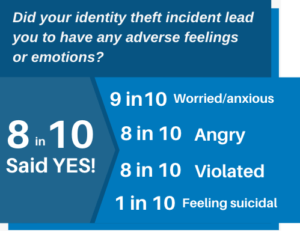 may also feel violated, betrayed, and helpless.
According to a study by the Identity Theft Resource Center, 70% of identity theft victims experience emotional distress. The study also found that victims are more likely to experience anxiety, depression, and post-traumatic stress disorder (PTSD) than people who have not been victims of identity theft.
If you are a victim of identity theft, it is important to seek help from a mental health professional. Talking to someone about what you are going through can help you cope with the emotional impact of the crime.
Steps to Recover from Identity Theft
If you find yourself a victim of identity theft, don’t panic. Here’s a systematic guide to help you regain control and mitigate any potential damage:
- Notify Your Insurance Provider: If you have identity theft insurance, inform them first for guidance and help.
- Alert Your Financial Institutions: Contact your bank and credit card issuers immediately to halt transactions and secure accounts.
- Contact Affected Companies: Reach out to companies where the theft occurred to inform their fraud department.
- Implement a Fraud Alert: Place a fraud alert on your credit with one of the three major credit bureaus.
- Review Your Credit Reports: Access your free credit reports from AnnualCreditReport.com and report any discrepancies.
- File a Report with the FTC: Visit identitytheft.gov to file a comprehensive identity theft report with the Federal Trade Commission (FTC).
- Report to Local Law Enforcement: Filing a police report provides an official record of the identity theft.
- Secure Your Online Presence: Change all online account passwords, consider using a password manager, and activate two-factor authentication.
- Replace Important Documents: Apply for replacements for stolen IDs like your driver’s license, passport, and Social Security card.
- Subscribe to Identity Theft Protection Services: Consider services like defend-id which monitor your financial and digital presence, providing alerts and insurance.
Steps to Take if You Suspect Identity Theft
If you suspect you’ve fallen victim to identity theft, take these essential steps promptly:
- Contact Your Financial Institutions: Reach out to your bank and credit card issuers immediately to freeze your accounts and halt unauthorized transactions.
- Report to Your Identity Theft Insurance Provider: Notify your provider right away for guidance and resources, including legal and financial assistance.
How Identity Theft Protection Services Help
Identity theft protection services, such as defend-id, play a crucial role in safeguarding your online and financial accounts from fraudulent activities. With defend-id’s advanced monitoring technology, subscribers receive alerts about potential fraud approximately four times faster than many competing services.
- Comprehensive Monitoring and Swift Alerts: defend-id provides detailed monitoring by keeping track of your personal and financial account activities. If something unusual is detected, defend-id promptly sends out an alert.
- Robust Insurance Coverage: defend-id offers significant financial protection with an insurance policy that can provide up to $1,000,000 in compensation for eligible losses caused by identity theft.
Protecting Yourself from Identity Theft and Fraud
Protecting yourself from identity theft and fraud is crucial. One effective way to safeguard your personal information is by using comprehensive services like defend-id, which offers robust monitoring and insurance coverage.
- Comprehensive Insurance Coverage: defend-id provides each plan member with a $1,000,000 insurance policy.
- Real-Time Monitoring and Alerts: defend-id monitors your financial and online accounts continuously, alerting you swiftly to any suspicious activity.
- Family Protection: defend-id’s Family Plan extends protection to up to five family members, including both adults and children.
- Trial Period: defend-id offers a 14-day free trial, allowing you to experience their service before committing.
Taking proactive steps by enrolling in a service like defend-id can provide peace of mind and significantly reduce the chances of suffering from identity theft and fraud.
Tactics Used by Identity Thieves
Identity thieves deploy various tactics to access personal data. They might steal your wallet, ID, or mail containing personal information, use a change-of-address scam, send phishing emails, texts, and calls, buy your data off the Dark Web, hack into your email, or intercept your data on an unsecured Wi-Fi network. Understanding these methods allows you to be more vigilant and take preventative measures to secure your personal and financial information.
Take Action Today
Identity theft is a serious crime, but you can protect yourself by taking necessary steps to safeguard your personal information and monitoring your credit reports regularly.
Resources:
- The Federal Trade Commission (FTC): 1-877-438-4338
- The Identity Theft Resource Center: 1-888-400-5530
- The National Association of Consumer Advocates: 1-800-644-7222
Don’t let identity theft ruin your credit and your life. Take action today to protect yourself!
Articles related to How to Protect Your Credit from Identity Theft:

by Brian Thompson | Jun 12, 2024 | Identity Theft
Safeguarding our personal information is crucial! Yet, many of us operate under certain misconceptions, trusting myths that could leave us vulnerable. Welcome to “Unmasking Identity Theft: Debunking 9 Common Myths.” This blog post aims to shed light on the most common myths surrounding identity theft protection and the truths hiding behind them. Dive in with us as we demystify and decode the realities of identity safety in our interconnected world.
Myth #1
“If I have identity theft protection, I’m 100% safe from all scams and fraud!”
Truth: While identity theft protection can alert you to suspicious activity, it doesn’t prevent the theft from happening in the first place. Always stay vigilant and cautious with your personal data!
Reality Check
While having identity theft protection is a proactive step towards securing your personal information, it’s important to understand its limits. These services are designed to monitor and alert you to suspicious activities, but they don’t take action on your behalf. You won’t find them automatically blocking access to your accounts, changing your passwords, or filing claims for you. That’s your role. Identity theft protection services act as an early warning system, but they rely on you to take decisive action.
Myth #2
“I don’t need identity theft protection; I’m careful with my personal info!”
Truth: Even if you’re cautious, data breaches at companies where you have accounts can expose your information. Identity theft protection helps monitor and alert you of potential threats.
Myth #3
“Credit monitoring is the same as identity theft protection.”
Truth: Credit monitoring is just one component. Identity theft protection often includes credit monitoring, but also checks other areas for fraud like bank accounts, social security, and even dark web scans! However, it’s important to recognize that while these services are comprehensive, they do not cover every single account type. Many programs focus primarily on credit-based accounts such as banking and credit cards, and some extend to popular social media platforms. Yet, it is less common for these programs to monitor other types of accounts like those for shopping, news sites, membership portals, and smaller social media platforms.
Myth #4
“Free credit reports offer the same protection as paid identity theft protection services.”
Truth: Free credit reports show your credit history, but they don’t actively monitor or alert you to suspicious activity. For more proactive monitoring, consider dedicated services.
Myth #5
“Once I’ve been a victim, I won’t be targeted again.”
Truth: Unfortunately, victims of identity theft can be targeted multiple times. It’s vital to ensure ongoing protection even after an incident.
Myth #6
“A strong password is enough to protect me.”
Truth: Strong passwords are essential, but cybercriminals have various methods like phishing and data breaches to bypass them. Comprehensive protection goes beyond just passwords!
Myth #7
“Only adults are at risk of identity theft.”
Truth: Sadly, children can also be victims. Their clean credit histories can be attractive to thieves. It’s essential to monitor their information too.
Myth #8
“I would instantly know if I became a victim.”
Truth: Some forms of identity theft can go undetected for months or even years! Regular monitoring can help catch issues before they escalate.
Myth #9
“Only people who shop online are at risk of identity theft.”
Truth: Identity theft can occur through various channels, not just online shopping. While online transactions are a common target due to the digital exchange of personal and financial information, identity thieves can also exploit physical documents, phone scams, and even public Wi-Fi networks. It’s essential to protect your personal information in all environments, both online and offline.
Do Data Breaches Always Lead to Identity Theft?
A clear understanding of the relationship between data breaches and identity theft is crucial. Not every data breach results in identity theft. A data breach occurs when there is unauthorized access to private data, but it does not necessarily mean the information was used maliciously. However, if the exposed data is accessed and misused by cybercriminals, it often leads to identity theft. Thus, while breaches raise the risk of identity theft, they don’t always result in such crimes. The actual impact depends on whether the breached information is criminally exploited.
Understanding Your Coverage
Identity theft can be financially devastating, but not all losses may be covered by your identity theft protection plan. It’s important to understand that while some plans include insurance for certain losses, coverage varies significantly among different providers and policies.
Vulnerability of Personal Data
Despite the immense resources companies allocate to cybersecurity, the harsh reality is that personal data can still be hacked or stolen. Major incidents such as the Equifax breach, which affected 230 million consumers, underscore the pervasiveness of the risk. From large corporations to individual users, no one is entirely immune to potential cybersecurity threats. Adopting identity theft protection services can be a start. These services can’t prevent all forms of data breaches but can enhance the security of your accounts.
Internal Threats and Other Sources of Identity Theft
It’s a common misconception that identity theft only emerges from massive corporate breaches. While these events are significant and newsworthy, they are far from the only source of such crimes. Identity thieves often exploit lesser-known access points, such as videogame systems and social media platforms, to harvest personal information. Additionally, phishing schemes frequently target specific companies, sometimes for sums as trivial as $7—a lucrative prospect for a disgruntled former employee. Moreover, an alarming 30% – 50% of all identity theft cases originate not from shadowy outsiders but from within the workplace itself, committed by coworkers who misuse their access to sensitive data.
Is Identity Theft Protection Just Scanning Software?
Identity theft protection often includes credit monitoring, but also checks other areas for fraud like bank accounts, social security, and even dark web scans! However, it’s important to understand that these services are not just set-it-and-forget-it solutions. While they provide comprehensive monitoring and alert systems, they do not autonomously manage security tasks such as blocking your accounts or changing your passwords. As a user, you will need to take action based on the alerts you receive. Essentially, identity theft protection services are proactive tools designed to notify you of potential threats, enabling you to take timely preventive measures.
Is Identity Theft Protection a Turnkey Solution?
The primary role of identity theft protection services is to monitor and alert the user to suspicious activities or potential threats, prompting them to take appropriate action. Users are expected to actively manage and secure their accounts, update their passwords regularly, and initiate any necessary legal or financial claims. Identity theft protection services do not handle actions such as closing or securing your accounts, updating your passwords, or managing the process of filing claims.
Understanding the Realities of Identity Theft
Understanding the realities of identity theft is the first step in truly protecting yourself. By debunking these myths, we hope to provide clarity and pave the path for more informed decisions. “Unmasking Identity Theft: Debunking 9 Common Myths” underscores the need to stay updated, vigilant, and proactive. Remember, in the realm of digital safety, knowledge isn’t just power; it’s your best line of defense. Stay safe, stay informed, and always prioritize your digital well-being.
Related Articles:

by Brian Thompson | Jun 11, 2024 | Employee Benefits, Identity Theft
Identity Theft Protection as an Employee Benefit
Identity theft is a growing concern that can have devastating effects on individuals and businesses alike. As an employer, integrating identity theft protection as an employee benefit into your wellness program is not just a valuable benefit but a necessity. Below we explore why identity theft protection is crucial for employee wellness and how it can enhance your organization’s overall productivity and employee satisfaction.
Understanding Identity Theft
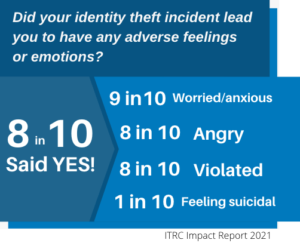
Identity theft occurs when someone uses another person’s personal information without permission, typically for financial gain. This can include stealing Social Security numbers, credit card information, or other sensitive data. According to the ITRC Impact Report, identity theft can lead to severe emotional and financial distress, making it difficult for victims to perform effectively at work.
The Toll of Identity Theft on Employees
The emotional and financial stress caused by identity theft can significantly impact employees’ well-being and job performance. A study found that 9 in 10 victims of identity theft experience negative emotions such as worry, anxiety, and anger. Moreover, 8 in 10 reported employment problems related to identity theft, including issues with coworkers and supervisors. When employees are distracted by personal crises, their productivity and morale can suffer, leading to higher turnover and lower engagement.
Why Employers Should Offer Identity Theft Protection
Employers have a unique opportunity to support their workforce by offering identity theft protection as an employee benefit as part of their wellness programs. By doing so, companies demonstrate a commitment to their employees’ overall well-being, which can enhance employee loyalty and employee satisfaction. Protecting employees’ identities helps them feel secure, enabling them to focus on their work without the distraction of dealing with identity theft issues.
Boosting Corporate Security Through Identity Protection Benefits
-
Social Media Protection
Implementing identity protection measures can play a critical role in safeguarding a company’s social media integrity. If an employee’s social media account is compromised, the repercussions can be significant. Unauthorized users may spread misinformation, engage in phishing attacks against the employee’s contacts, or even misuse the company’s brand to commit fraud. An effective identity protection program actively monitors for such irregular activities, promptly detects unauthorized access, and alerts the employees, thereby minimizing potential harm to the company.
-
Comprehensive Employee Education
Ongoing education is another cornerstone of strengthening corporate security via identity protection benefits. Employees serve as the first line of defense against security breaches. Regular training sessions should cover:
- The importance of robust password practices and account security measures.
- Awareness of the latest techniques used by cybercriminals and identity thieves.
- Updates on recent data breaches and security threats which could potentially impact the company.
This continual education helps in building a knowledgeable workforce that can recognize and mitigate threats effectively.
-
Protection of Sensitive Corporate Information
Identity protection benefits extend beyond personal data to include critical corporate assets like company credit cards, usernames, and passwords. For employees entrusted with accessing sensitive corporate information, safeguarding these assets is paramount. Identity protection services ensure that all components are closely monitored for any unauthorized access or transactions, further securing corporate financial and digital assets.
Through these measures, identity protection benefits not only secure individual employees but also fortify the organization’s overall cybersecurity framework.
Employee Engagement and Business Success
Employee engagement stands as a cornerstone of business success. Engaged employees drive productivity, foster a positive work environment, and contribute to the economic vitality of their organizations. Disengaged employees, on the other hand, can lead to substantial financial losses, with engagement research indicating potential costs to businesses in the billions annually.
One prevalent issue that can swiftly erode employee engagement is identity theft. This personal crisis demands considerable time and emotional energy to resolve, often diverting the employee’s focus and commitment away from work responsibilities. The process is fraught with uncertainty and stress, making it difficult for employees to maintain their usual levels of engagement at work. The resultant impact is not just on the employees’ productivity, but also on their morale and loyalty to the company, ultimately threatening overall business stability and success.
How Identity Protection Benefits Enhance Corporate Security
Employers have a unique opportunity to support their workforce by offering identity theft protection as an employee benefit as part of their wellness programs. By doing so, companies demonstrate a commitment to their employees’ overall well-being, which can enhance employee loyalty and employee satisfaction. Protecting employees’ identities helps them feel secure, enabling them to focus on their work without the distraction of dealing with identity theft issues.
Moreover, a robust identity protection program doesn’t just offer security after the fact; it provides comprehensive, preventative solutions aimed at mitigating risks before they occur. Such measures include educating employees on the importance of data security, protecting sensitive information like corporate credit cards, usernames, and passwords, and implementing tools to monitor and protect against breaches on social media platforms.
These proactive steps ensure that employees can dedicate their attention to their career growth, while the company benefits from maintaining a secure, engaged, and focused workforce. By integrating these elements into their corporate security strategy, companies can shield themselves and their employees from the profound impacts of identity theft, making the workplace a safer and more productive environment.Implementing Identity Theft Protection in Wellness Programs
Implementing Identity Theft Protection in Wellness Programs
To effectively integrate identity theft protection as an employee benefit into your wellness program, consider the following steps:
- Choose Comprehensive Services: Select a service that offers comprehensive monitoring and recovery solutions. defend-id, for example, provides fully managed recovery services, credit monitoring, dark web monitoring, expense reimbursement insurance, and many other features.
Expanding on the Details:
- Identity Theft Expense Reimbursement: Ensure that the service includes a robust identity theft expense reimbursement. It’s vital that the plan offers substantial coverage to handle the potential expenses arising from fraud. For instance, a standard should be set at a minimum of $1 million in coverage. This coverage should be backed by a reputable insurance provider, such as AIG, guaranteeing that the funds are available for a breadth of costs including, but not limited to, an employee’s lost wages, legal fees, medical records request fees, CPA fees, childcare fees, and more.
- Enhanced Dark Web Monitoring: The identity protection plan should also feature a proactive dark web monitoring service. This means that employees should have the option to register sensitive documents, like driver’s licenses and credit cards, with the service provider. In the event that these registered documents are found on the dark web, the employee should be alerted immediately. Following the alert, the provider should actively collaborate with the employee to address and resolve the issue, ensuring minimal impact and swift action.
- Educate Employees: Raise awareness about the risks of identity theft and how to prevent it. Provide regular training sessions and resources to help employees understand the importance of protecting their personal information.
- Offer Flexible Plans: Provide flexible product and pricing structures to meet the diverse needs of your employees. Consider offering both individual and family plans to ensure all employees and their dependents are protected.
- Promote the Benefits: Communicate the advantages of identity theft protection to your employees. Highlight how these services can save time, reduce stress, and provide peace of mind.
Success Stories and Testimonials

Real-life examples and testimonials can be powerful tools to illustrate the benefits of identity theft protection. One employee shared their experience with defend-id, stating, “My Recovery Advocate was a great help. This was my first experience with ID theft. He helped me through all of it, every step because I was lost. I felt the entire process was easy and a ton of weight is now off my shoulders”. Such stories emphasize the real impact these services can have on employees’ lives.
Check out a case study of a mortgage company in CT here: Case Study
Final thoughts
Identity theft protection as an employee benefit is an essential component of a comprehensive employee wellness program. By offering these services, employers can help mitigate the emotional and financial stress caused by identity theft, ultimately enhancing workplace productivity and employee satisfaction. Investing in identity theft protection is not just a benefit; it is a proactive step toward fostering a secure and focused workforce.
Encourage your organization to prioritize identity theft protection as an employee benefit today. For more information on integrating these services into your wellness program, visit defend-id.
defend-id.
Articles related to identity theft protection employee benefit:
by Brian Thompson | Jun 5, 2024 | General, Identity Theft
Traveling can be exciting, but it also comes with risks, such as identity theft. Vacationers are often more relaxed and less vigilant about their personal information, making them easy targets for thieves. However, with a few simple precautions, you can enjoy your trip without worrying about your personal information falling into the wrong hands. Here are essential tips to protect your identity while traveling and ensure a secure vacation.
1. Secure Your Personal Documents
Before you leave for your vacation, make sure to secure your personal documents. This includes your passport, driver’s license, and any other identification cards you may be carrying. Keep these documents in a secure location, such as a hotel safe or a locked suitcase. Avoid carrying unnecessary documents with you, and if you need to bring them, make sure to keep them hidden and out of sight. By taking these precautions, you can minimize the risk of your personal information being stolen while you’re traveling.
2. Use a VPN When Accessing Public Wi-Fi
When you’re traveling and need to connect to public Wi-Fi, it’s important to use a virtual private network (VPN) to protect your identity. Public Wi-Fi networks are often unsecured, making it easy for hackers to intercept your personal information. A VPN creates a secure connection between your device and the internet, encrypting your data and keeping it safe from prying eyes. By using a VPN, you can browse the internet, check your email, and access your online accounts without worrying about your personal information being stolen.
3. Be Cautious with Your Credit Cards
When traveling, it’s important to be cautious with your credit cards to protect your identity. Avoid using your credit card for purchases at unsecured or unfamiliar locations, as these may be more susceptible to skimming devices or fraudulent activity. Instead, opt for cash or use a secure payment method such as a mobile wallet or chip-enabled card. Additionally, regularly monitor your credit card statements and report any suspicious activity immediately to your credit card company. By taking these precautions, you can enjoy your vacation without the worry of identity theft.
4. Avoid Oversharing on Social Media
While it may be tempting to share every detail of your vacation on social media, it’s important to exercise caution. Oversharing can make you a target for identity theft, as criminals can use the information you post to piece together your personal details. Avoid posting your exact travel dates, location, or any other sensitive information that could be used to compromise your identity. Instead, wait until you return home to share your vacation memories. By being mindful of what you share online, you can help protect your identity while traveling.
5. Set Up a Mail Hold
If you’re going to be away from home for more than a few days, submit a mail hold to the U.S. Postal Service for up to 30 days. You can retrieve your mail once the hold has expired. A mail hold can keep bank statements, credit card bills, and other mail from being used to steal your identity. To hold your mail longer or to reroute your mail, sign up for the Postal Service’s forwarding service.
6. Don’t Bring Unneeded Documents and Cards
Travelers typically need to carry a driver’s license or identification card, travel credit cards, insurance cards, and possibly a passport. But you should leave behind your Social Security card, birth certificate, and other documents that have sensitive personal information. In other words, your wallet, purse, or backpack shouldn’t hold documents and cards that you may want to bring but don’t need to bring.
7. Be Careful at ATMs
For identity thieves, an ATM can be a money-making machine. For instance, they might install a skimming device or shimming device on an ATM to capture card numbers and PINs. To protect your card number and PIN at an ATM when you’re traveling:
- Use a bank-operated ATM rather than a non-bank ATM. Non-bank ATMs, found at places like convenience stores, might not be as safe as those overseen by banks and other financial institutions.
- Change your ATM passcode before and after your trip.
- Use your hand to block the ATM keypad. This can help prevent a person or a hidden camera from seeing your PIN as you’re typing it.
8. Act Quickly if a Card Is Lost or Stolen
If your credit or debit card has been lost or stolen while traveling, report it right away to the card issuer. This may help prevent or minimize financial harm. You can contact the card issuer by looking for the customer service phone number on the card or finding it on the card issuer’s website or app. Federal law safeguards consumers against steep financial losses from a lost or stolen credit or debit card. In the case of a lost or stolen credit card, you might be responsible for as much as $50 in unauthorized charges (though many cards offer zero liability protection). For a lost or stolen debit card, your financial liability depends on how fast you report that the card went missing.
9. Consider an Identity Monitoring Service to protect your identity while traveling
Adding an identity monitoring service to your security toolkit could give you some peace of mind while you’re traveling. An identity monitoring service like the one offered by Defend-ID tracks personal information in credit applications, on websites, in public records, and in other places to spot possible signs of identity theft, and may also offer ID theft insurance.
Frequently Asked Questions
What should I do if my identity is stolen while traveling?
- Contact your providers: Reach out to all of your banks and credit card companies, not just the ones directly involved in the identity theft. You might be advised to close existing accounts and open new ones to help avoid problems.
- Contact the authorities: File identity theft reports with a local law enforcement agency and the FTC.
- Freeze your credit files: …with the three major credit reporting agencies—Experian, TransUnion, and Equifax. A credit freeze severely limits access to your credit information. You can unfreeze your files at any time.
- Review your recent transactions: Go through your bank and credit card accounts online to see whether any suspicious activity shows up. If it does, reach out to your bank or credit card company as soon as possible.
- Monitor your credit report: Obtain your credit report from each of the three credit bureaus to keep an eye out for any suspicious activity. You can also get your reports from all three bureaus weekly at AnnualCreditReport.com.
- Change online passwords: This is especially important for bank accounts and credit card accounts.
Should You Travel With Your Social Security Card?
You should never travel with your Social Security card. Instead, leave it at home in a safe place. In fact, the Social Security Administration advises not carrying your Social Security card with you at all, whether you’re traveling or not. Instead, share your card only when it’s required, which the federal agency says rarely happens.
Does Travel Insurance Cover Credit Card Theft?
Travel insurance might cover credit card theft. However, the coverage likely won’t include reimbursement for financial losses. Rather, a travel insurance company’s representatives can help you cancel credit cards, file a police report, and carry out other tasks associated with credit card theft.
By following these tips, you can significantly reduce the risk of identity theft while traveling and enjoy a secure vacation. Remember, while there is no foolproof way to prevent identity theft, taking these precautions can help you stay safe and protect your personal information.
Article related to protecting your identity while traveling